
If you’ve ever uploaded code to your Arduino and nothing happened, you already know the frustration. Is it the code? The wiring? A dead component? A multimeter answers those questions in seconds.
A multimeter is one of the most essential tools on any electronics workbench. It measures voltage, current, and resistance, and most models also include a continuity tester, which lets you check if a wire or connection is complete with a simple beep. For anyone working with Arduino, ESP32, Raspberry Pi, or any microcontroller project, it’s not optional gear — it’s the first tool you should own after your board.
This guide covers the best multimeter for electronics beginners and hobbyists in 2026, from reliable budget options under $20 to a premium Fluke that will last you decades.
Already have your tools sorted? Check out our guide to the best Arduino starter kits to get your first project up and running.
Why Every Arduino Hobbyist Needs a Multimeter
Before jumping into picks, here’s exactly where a multimeter saves you in real projects:
Checking power supply voltage. Before connecting anything to your Arduino, you can verify your power source is delivering the right voltage. Overvoltage can destroy a board instantly.
Testing continuity. Breadboard connections fail more often than you’d think. A quick continuity test tells you immediately if a wire or jumper is properly connected or broken.
Measuring sensor output. When a sensor isn’t behaving as expected, measuring its output voltage directly helps you figure out if the problem is the sensor, the wiring, or the code.
Checking resistor values. Resistors lose their color band markings when they get mixed up. A quick resistance reading tells you exactly what you have.
Debugging LED circuits. Not sure why an LED isn’t lighting up? Test voltage across it, check the resistor, and trace the problem in under a minute.
What to Look for in a Multimeter for Electronics Work
Auto-ranging vs manual ranging. Auto-ranging multimeters automatically select the correct measurement range, which is much more convenient for beginners. Manual-ranging meters are cheaper but require you to set the range yourself before measuring.
True RMS. For AC voltage measurements, True RMS (TRMS) meters give accurate readings on non-sinusoidal waveforms. Most Arduino projects run on DC so this matters less, but it’s a useful feature if you ever work with AC circuits or motor control.
Continuity buzzer. An audible beep when continuity is detected is essential for fast circuit debugging. Nearly all modern multimeters have this, but always confirm before buying.
NCV detection. Non-contact voltage detection lets you check if a wire is live without touching it. Useful if you ever work near mains voltage.
CAT rating. For hobbyist use, CAT II or CAT III is sufficient. CAT ratings indicate the level of electrical environment the meter is safe to use in.
Quick Comparison Table
| Multimeter | Type | Best For | Price Range |
|---|---|---|---|
| AstroAI AM33D | Manual | First multimeter, ultra-budget | ~$15 |
| Crenova MS8233D | Auto | Budget with NCV | ~$25 |
| INNOVA 3320 | Auto | Best beginner pick | ~$35 |
| AstroAI TRMS 6000 | Auto + TRMS | Best value features | ~$35 |
| Klein Tools MM400 | Auto + TRMS | Best mid-range hobbyist | ~$50 |
| Fluke 117 | Auto + TRMS | Best premium long-term | ~$200 |
1. Best Ultra-Budget Multimeter
AstroAI AM33D
Best for: First multimeter, students, casual use

If you just need something to check voltages, test continuity, and measure resistance without spending much, the AstroAI AM33D gets the job done. It’s a manual-ranging meter, meaning you set the range yourself before measuring, but at this price it’s hard to argue against it as a starting point.
For basic Arduino work, checking if 5V is reaching a sensor or whether a wire has continuity, it handles everything you need.
What it measures:
- DC and AC voltage
- DC current
- Resistance
- Continuity with audible beep
- Diode testing
Things to keep in mind:
- Manual ranging takes getting used to
- No auto power-off on some versions
- Display is basic but readable
Verdict: A solid first multimeter if budget is the main concern. When you’re ready to upgrade, the skills transfer directly to any other meter.
2. Best Budget Multimeter with NCV
Crenova MS8233D
Best for: Budget buyers who want auto-ranging and NCV detection

The Crenova MS8233D steps up from the AM33D with auto-ranging and a non-contact voltage detector built in. For around $30, that’s a meaningful upgrade. Auto-ranging alone saves a lot of time when you’re constantly switching between voltage checks and resistance measurements mid-project.
It has a clean backlit display, a comfortable grip, and covers all the measurements a hobbyist needs day to day.
What it measures:
- DC and AC voltage (auto-ranging)
- Resistance and capacitance
- Frequency
- Continuity with audible beep
- Non-contact voltage detection (NCV)
Things to keep in mind:
- Not True RMS
- Build quality is functional but not premium
👉 Buy Crenova MS8233D on Amazon
Verdict: A well-rounded budget pick. The auto-ranging and NCV features make it noticeably more pleasant to use than a basic manual meter.
3. Best Beginner Multimeter Overall
INNOVA 3320
Best for: Beginners who want a reliable, easy-to-use meter without overthinking it
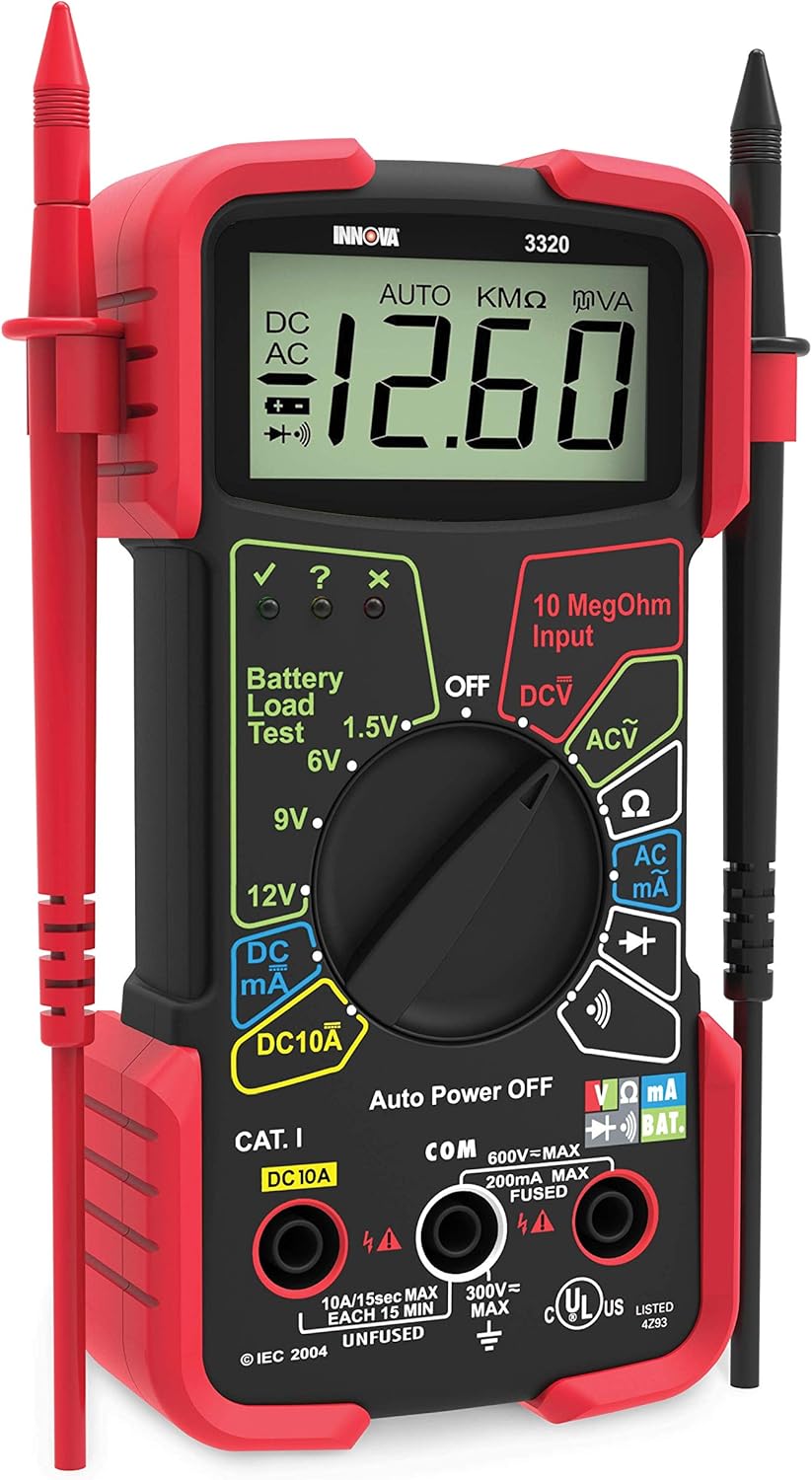
The INNOVA 3320 is one of the most recommended beginner multimeters on the market, and it earns that reputation. It’s auto-ranging, well-built for the price, and comes with a large backlit display that’s easy to read in any lighting condition. INNOVA is a trusted brand in the hobbyist and automotive tool space, so you’re not buying an unknown generic.
For Arduino and ESP32 projects, it covers everything reliably. Testing 3.3V and 5V power lines, checking GPIO pin voltages, measuring resistors, testing continuity in wiring, this meter handles it all without fuss.
What it measures:
- DC and AC voltage (auto-ranging)
- DC current
- Resistance
- Continuity with audible beep
- Diode testing
- Battery testing
Why it stands out:
- Trusted brand with good customer support
- Auto-ranging makes it beginner-friendly
- Solid build quality for the price
- Large, easy to read backlit display
Verdict: The best starting point for most beginners. Reliable, easy to use, and priced where it should be. This is the one to recommend to someone who asks “which multimeter should I get first?”
4. Best Value Feature-Packed Multimeter
AstroAI TRMS 6000
Best for: Hobbyists who want True RMS and a high-count display without paying premium prices

The AstroAI TRMS 6000 is where things get genuinely impressive for the price. It’s a True RMS meter with a 6000-count display, which gives you much finer measurement resolution than most budget meters. True RMS accuracy matters when you’re working with PWM signals, motor controllers, or any project where the waveform isn’t a clean DC line.
It also includes temperature measurement with a thermocouple probe, capacitance, frequency, and an auto-off function. For around $40, it punches well above its weight.
What it measures:
- DC and AC voltage (True RMS, auto-ranging)
- AC/DC current
- Resistance and capacitance
- Frequency and duty cycle
- Temperature (with included probe)
- Continuity and diode testing
Why it stands out:
- True RMS at this price point is rare
- 6000-count display for better precision
- Temperature measurement is useful for motor and battery projects
- Auto power-off saves battery
👉 Buy AstroAI TRMS 6000 on Amazon
Verdict: The best value on this list if you want features beyond the basics. Especially useful if your projects involve PWM, servo motors, or any kind of AC component.
5. Best Mid-Range Multimeter for Hobbyists
Klein Tools MM400
Best for: Serious hobbyists and makers who want professional-grade reliability

Klein Tools is a professional-grade brand used by electricians and engineers. The MM400 brings that build quality into a meter that’s still accessible to advanced hobbyists. It’s a True RMS auto-ranging meter with a CAT III 600V safety rating, a low-impedance mode for ghost voltage detection, and a thoughtfully designed interface.
For complex Arduino or ESP32 projects involving motor drivers, relay boards, power supply circuits, or anything that mixes signal and power, the MM400 gives you the accuracy and reliability to debug with confidence.
What it measures:
- DC and AC voltage (True RMS, auto-ranging)
- AC/DC current up to 10A
- Resistance, continuity, diode
- Capacitance and frequency
- Temperature
Why it stands out:
- Professional Klein Tools build quality
- Low impedance mode (LoZ) prevents false readings
- CAT III 600V rating for safety
- Bright display with backlight
- Magnetic hanging strap included
👉 Buy Klein Tools MM400 on Amazon
Verdict: The best multimeter for makers who have outgrown beginner tools. Built to last years of regular use and accurate enough for demanding projects.
6. Best Premium Multimeter
Fluke 117
Best for: Advanced hobbyists and professionals who want the best meter available

Fluke is the gold standard in multimeters. Professional electricians, engineers, and electronics technicians worldwide rely on Fluke meters because they are simply the most accurate and most durable handheld meters you can buy. The Fluke 117 is their electrician-focused model, designed specifically for working in environments with variable frequency drives and non-linear loads.
For electronics hobbyists, the 117 is overkill in terms of safety ratings, but the measurement accuracy, build quality, and reliability are in a completely different league from budget options. If you want one meter that will last 20 years and never give you a questionable reading, this is it.
What it measures:
- DC and AC voltage (True RMS, auto-ranging)
- AC/DC current
- Resistance, continuity, diode
- Capacitance and frequency
- Non-contact voltage detection (NCV)
- Min/Max/Average recording
Why it stands out:
- Industry-standard accuracy
- Extremely robust build, drop-tested
- AutoVolt automatically selects AC or DC
- Built-in NCV detector
- Backlit display readable in any condition
- Backed by Fluke’s warranty and support
Verdict: An investment, not just a purchase. If you’re serious about electronics and want a meter you’ll never need to replace, the Fluke 117 is the answer. Many hobbyists buy a budget meter first, outgrow it, and end up buying the Fluke anyway.
Which Multimeter Should You Buy?
Here’s the simple version:
Just starting out and want to spend as little as possible: Go with the AstroAI AM33D. It covers the basics and gets you measuring on day one.
Best first multimeter for most beginners: The INNOVA 3320 is the sweet spot. Auto-ranging, reliable brand, right price.
Want more features without spending much: The AstroAI TRMS 6000 gives you True RMS and temperature measurement at a surprisingly low price.
Ready for a serious upgrade: The Klein Tools MM400 is built like a professional tool and will handle anything your projects throw at it.
Want the best and don’t mind paying for it: The Fluke 117 is the last multimeter you’ll ever need to buy.
What to Measure on Your Arduino Projects
Once your multimeter arrives, here are the first things to check on any Arduino build:
5V and 3.3V pins. Probe the 5V and GND pins on your Arduino and confirm you’re getting stable voltage. Anything significantly below 4.8V suggests a power supply issue.
Sensor output voltage. Connect a sensor and measure the voltage on its output pin while it’s active. This tells you immediately if the sensor is working, even before you write any code.
Continuity across jumper wires. Breadboard jumpers fail more often than you’d expect. A quick beep test on each wire rules them out when debugging.
Resistor values. Pull a resistor from your kit, measure it, and confirm it matches what’s labeled. Especially useful when color bands are hard to read.
Voltage across LEDs. Measure the forward voltage across a lit LED. Most red LEDs show around 1.8V to 2.2V. If you’re getting 0V, the circuit isn’t completing.
Final Recommendation
For most Arduino and ESP32 hobbyists, the INNOVA 3320 is the best starting point, and the Klein Tools MM400 is the best upgrade when you’re ready for it.
If you’re building anything beyond basic breadboard circuits, having a reliable multimeter on your bench will save you more time than any other tool you own.
Building your first Arduino project and need components? See our guide to the best Arduino starter kits for the top beginner-friendly bundles available right now.
Ready to solder your builds permanently? Check out our best soldering kits for beginners guide.