
Finding the best laser engraver for hobbyists means balancing three things that pull in different directions: enough power to cut and engrave properly, a safety setup you can live with day to day, and a price that doesn’t require justifying to a spouse. Once you have one, you stop buying custom enclosures and start cutting them yourself. If you build electronics projects, a laser engraver also solves a problem that has nothing to do with lasers directly: it makes professional-looking enclosures, front panels, and PCB stencils achievable on a hobbyist budget.
This guide covers seven machines across a genuine range of budgets, from a $200 entry-level diode engraver to a $2,000 dual-source fiber and diode machine capable of marking metal with industrial-grade precision. We verified availability and cross-referenced owner reviews and independent hands-on coverage for every machine here, so the picks reflect how they actually perform once out of the box, not just what the spec sheet claims.
Building the electronics to go inside your laser-cut enclosures? Our guides on the Best Soldering Stations and Best Bench Power Supply cover the rest of a well-equipped workshop.
Quick Comparison Table
| Machine | Laser Type | Power | Work Area | Best For |
|---|---|---|---|---|
| xTool M2 10W | Diode | 10W | 220x220mm (enclosed) | Best enclosed beginner machine |
| Sculpfun S30 Pro Max | Diode | 20W | 410x400mm (expandable to 935x905mm) | Best expandable work area |
| Ortur Laser Master 3 | Diode | 10W | 400x400mm | Best budget entry point |
| Sculpfun SF-A9 40W | Diode | 40W | 400x400mm | Best high-speed cutting power |
| Twotrees TTS-20 Pro | Diode | 20W | 418x418mm | Best value all-metal frame |
| Atomstack Kraft | Dual (Diode + IR) | 20W + 1.2W | 500x320mm | Best enclosed dual-laser for metal |
| xTool F1 Ultra | Dual (Fiber + Diode, galvo) | 20W + 20W | 220x220mm | Best premium metal + wood machine |
1. Best Enclosed Beginner Machine: xTool M2 10W
xTool M2 10W Laser Engraver
Best for: Beginners who want a genuinely safe, fully enclosed machine that works straight out of the box.

The M2 is xTool’s answer to a real problem with most diode laser engravers: they are open-frame, Class 4 machines that need safety glasses, careful ventilation, and a dedicated corner of the garage. The M2 is fully enclosed and Class 1 certified, so the lid blocks the laser light entirely and you can run it on a desk without eye protection. For a home studio, an apartment, or anyone who has put off buying a laser engraver over the safety setup involved, this changes the calculus completely.
Reviewers who have put real hours on the 10W model describe it as performing exactly like a good 10W diode should: capable of cutting thin basswood and engraving wood, leather, and acrylic cleanly. The dual-camera ACS positioning system stands out in hands-on coverage: a 5MP panoramic camera plus a 2MP close-range camera let you place material and see exactly where the design will land before committing, a real time-saver on repeat jobs. The recurring complaint in owner feedback is the magnetic material platform, which doesn’t fully support material after a cut completes, occasionally causing acrylic to shift mid-cut.
Specifications:
- Laser type: 10W diode (blue, 455nm)
- Work area: 220 x 220mm, fully enclosed
- Safety class: Class 1 (no eyewear required)
- Camera: Dual-camera ACS positioning (5MP panoramic + 2MP close-range)
- Software: xTool Creative Space (XCS), LightBurn compatible
- Expansion: 20W diode upgrade and 3W IR module available separately
Why it stands out:
- Fully enclosed Class 1 design means no safety glasses or dedicated ventilation setup
- Dual-camera positioning genuinely speeds up material placement for repeat jobs
- Modular design lets you add a 20W diode head or 3W infrared module later rather than buying a new machine
- xTool Studio’s guided first-job workflow is consistently praised as beginner-friendly
Things to keep in mind:
- 10W is noticeably slower on thick material than the 20W+ machines here; expect multiple passes over a few millimeters
- The magnetic material platform can let acrylic shift during multi-pass cuts, a known quirk in owner feedback
👉 Buy xTool M2 10W Laser Engraver on Amazon
Verdict: The safest realistic starting point for anyone new to laser engraving, especially indoors. If budget allows, the 20W version of the same machine is worth the upgrade for faster cutting.
2. Best Expandable Work Area: Sculpfun S30 Pro Max
Sculpfun S30 Pro Max 20W Laser Engraver
Best for: Makers who want the option to grow their work area over time without buying a second machine.

The S30 Pro Max ships with a 410x400mm work area, already generous for most hobbyist projects, but the real selling point is what happens after: separately sold X and Y-axis extension kits push the working area out to a genuinely enormous 935x905mm, enough room for full sheets of plywood or batch-producing smaller items in a single pass. That means the machine you buy today doesn’t become the machine you outgrow next year.
The 20W laser is built from four coupled 6W diodes and cuts 15mm wood or 10mm acrylic in a single pass, with automatic air assist that engages during cutting and disengages during engraving without manual switching. Owner reviews are broadly positive on build quality and cutting performance, with one theme worth flagging honestly: several owners report WiFi connectivity can be unreliable out of the box, and that Sculpfun’s lens-replacement documentation is thinner than it should be for a machine at this price. Neither issue affects core cutting or engraving performance.
Specifications:
- Laser type: 20W diode (4x 6W coupled)
- Work area: 410x400mm standard, expandable to 935x905mm
- Cutting capacity: 15mm wood, 10mm acrylic, single pass
- Air assist: Automatic, engages on cut/disengages on engrave
- Accuracy: 0.06 x 0.06mm
- Included: One replacement lens
Why it stands out:
- Genuinely expandable work area via official extension kits, a rare feature at this price
- 20W cutting power handles thick material in a single pass
- Automatic air assist removes a manual step most competing machines still require
- Industrial-grade linear slide rail reduces the wavy engraving pattern common on cheaper designs
Things to keep in mind:
- WiFi connectivity is inconsistent for some owners; USB or TF card remains the most reliable workflow
- Extension kits for the larger work area are sold separately and add meaningfully to total cost
👉 Buy Sculpfun S30 Pro Max on Amazon
Verdict: A strong pick because it scales with you. If there is any chance you will want a larger work area down the line, this expandable platform saves you a second machine purchase later.
3. Best Budget Entry Point: Ortur Laser Master 3
Ortur Laser Master 3 10W Laser Engraver
Best for: First-time buyers who want a genuinely capable machine without spending north of $300.

Ortur built a reputation on safety-focused, no-nonsense diode engravers, and the Laser Master 3 continues that pattern at an accessible price. The 10W module uses dual-compression diode technology to hit true 10W output, cutting 12mm plywood or 10mm black acrylic in a single pass, with speeds up to 20,000mm/min thanks to a lightweight 235g laser head. Assembly takes about 20 minutes according to most owner accounts, and the machine supports TF card, USB, WiFi, and app control out of the box.
What sets Ortur apart at this price is the safety feature list: eight separate protections including tilt and motion detection, an emergency stop, exposure time limiting, and voltage/current safety control. The panoramic protective shield blocks 97% of UV light, which Ortur markets as eliminating the need for separate safety glasses, though independent reviewers recommend wearing proper laser safety glasses regardless, rated to block the 450±5nm wavelength specifically, since the shield reduces exposure rather than eliminating it.
Specifications:
- Laser type: 10W diode (dual-compression)
- Work area: 400x400mm
- Cutting capacity: 12mm plywood, 10mm black acrylic, single pass
- Speed: Up to 20,000mm/min
- Safety: 8-point protection system, 97% UV-blocking shield
- Control: TF card, USB, WiFi, app
Why it stands out:
- True 10W output at one of the most accessible price points in this roundup
- Eight-layer safety system is genuinely comprehensive for the price
- Lightweight 235g laser head keeps high engraving speeds achievable
- Compatible with LaserGRBL, LightBurn, and Ortur’s own app across all major platforms
Things to keep in mind:
- Despite the UV-blocking shield, independent reviewers still recommend proper laser safety glasses for the 450nm wavelength
- Open-frame design requires a dedicated, ventilated workspace
👉 Buy Ortur Laser Master 3 on Amazon
Verdict: The best true entry point here. It doesn’t try to be more than a solid, safety-conscious 10W diode engraver, and it succeeds at exactly that without cutting corners on what matters most for a first machine.
4. Best High-Speed Cutting Power: Sculpfun SF-A9 40W
Sculpfun SF-A9 40W Laser Cutter and Engraver
Best for: Makers who prioritize raw cutting speed and thickness capacity over anything else on the spec sheet.

The SF-A9 40W is built around a different value proposition than most diode engravers at this price: speed and power first. At 36,000mm/min, Sculpfun markets it as one of the few true high-speed laser engravers on the market, and independent hands-on coverage backs that up, describing the build as feeling “premium” straight out of the box, with all-metal construction that stays stable running at that speed. The 40W diode cuts wood and dark acrylic up to 30mm thick and stainless steel up to 0.15mm, putting cutting depth within reach that 10-20W machines simply cannot match in a single pass.
The flame and temperature sensor system is a genuinely useful safety feature: it detects flames during operation and automatically halts the machine while moving the laser head to the safest position, rather than just cutting power in place. Precision focusing uses a two-stage system, a red knob for quick height positioning and a separate fine-adjustment knob, which owner feedback consistently describes as more intuitive than single-adjustment systems on competing machines.
Specifications:
- Laser type: 40W diode
- Work area: 400x400mm (adjustable height support pillars included)
- Cutting capacity: 30mm wood/acrylic, 0.15mm stainless steel
- Speed: Up to 36,000mm/min
- Accuracy: 0.01mm motion accuracy
- Safety: Flame and temperature sensor with automatic safe-position response
Why it stands out:
- 40W output and 36,000mm/min speed genuinely outpace most machines in this price range
- All-metal construction holds stability at high speed, a common weak point on cheaper high-speed claims
- Two-stage focus system (coarse height + fine focus) is more precise than single-knob designs
- Automatic flame detection response moves the laser head to safety rather than just stopping in place
Things to keep in mind:
- 40W output requires serious attention to ventilation and fire safety given the cutting depth it is capable of
- Open-frame design; proper laser safety glasses are mandatory, not optional
👉 Buy Sculpfun SF-A9 40W on Amazon
Verdict: The pick for makers who’ve outgrown lower-wattage machines and want genuine cutting depth and speed. Build quality holds up to the power on offer, but this machine demands a properly ventilated, fire-safe workspace to match.
5. Best Value All-Metal Frame: Twotrees TTS-20 Pro
Twotrees TTS-20 Pro 20W Laser Engraver
Best for: Buyers who want a full-size, all-metal-frame 20W machine with air assist and a honeycomb bed included, below most 20W competitors’ price.
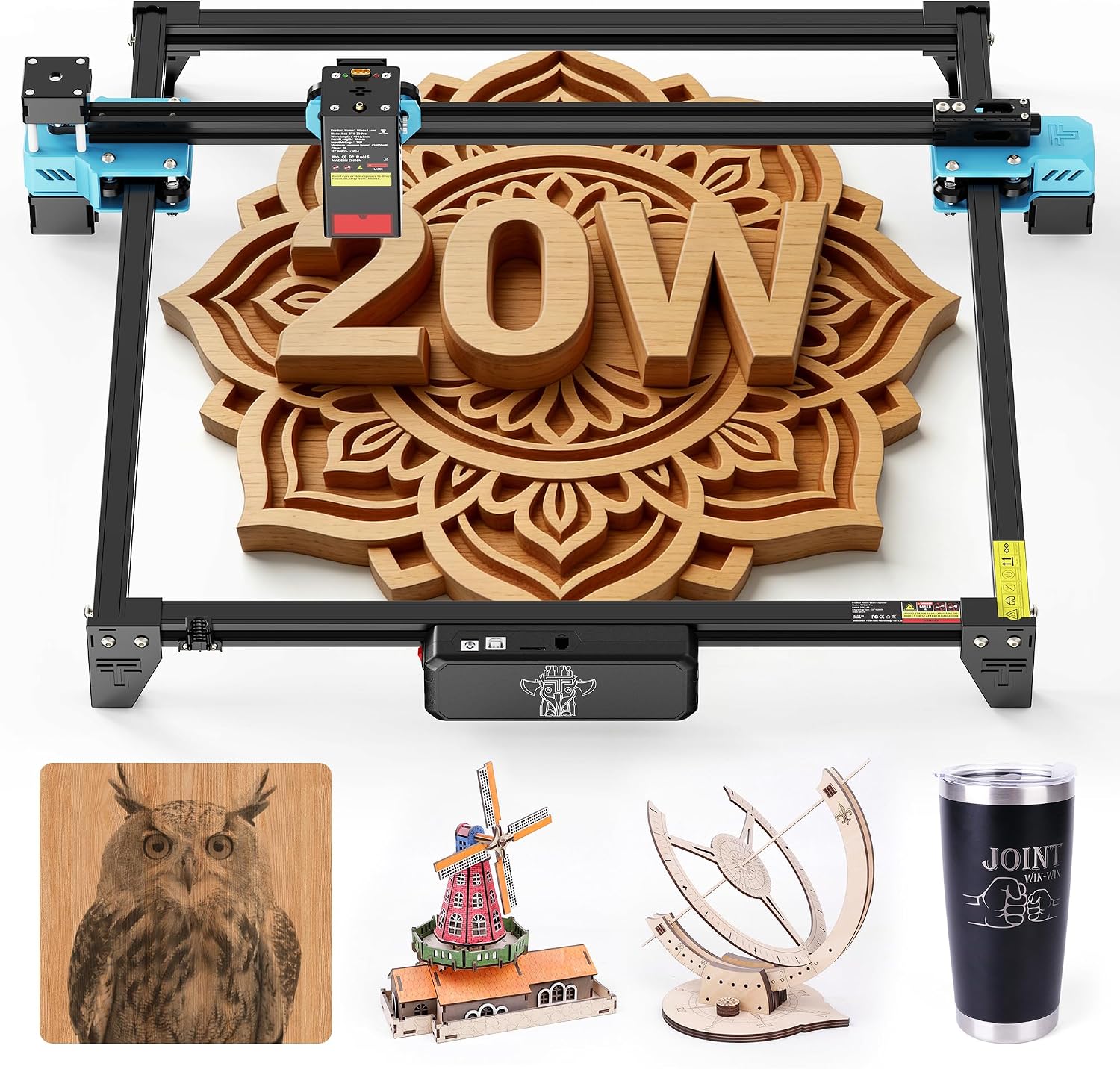
Twotrees built its reputation on 3D printers before expanding into laser engravers, and the manufacturing discipline shows in the TTS-20 Pro’s build quality. The lightweight aluminum frame arrives roughly 98% pre-assembled according to multiple independent reviews, with most remaining setup involving plugging in the control box, limit switches, and laser module. The 418x418mm work area is among the largest standard sizes here, and the included honeycomb panel and 10-30L/min adjustable air pump are genuinely useful inclusions some competitors charge extra for.
Reviewers consistently note two things worth factoring in. First, positioning the laser precisely on smaller materials takes noticeably longer than on camera-assisted machines, since the TTS-20 Pro relies entirely on manual positioning. Second, the included safety glasses have drawn specific criticism: several reviewers who tested them against proper laser safety eyewear found the stock green glasses do not adequately block the 450±5nm wavelength the laser emits, and recommend buying separately rated glasses rather than relying on what ships in the box.
Specifications:
- Laser type: 20W diode (22W peak)
- Work area: 418x418mm
- Frame: All-aluminum, ~98% pre-assembled
- Included: Honeycomb bed, adjustable air assist pump (10-30L/min)
- Motherboard: 32-bit
- Control: USB, microSD card
Why it stands out:
- All-metal frame and near-complete pre-assembly make setup faster than most competitors in this price range
- Honeycomb bed and air assist pump included standard, not sold separately
- 418x418mm work area is generously sized for the price point
- Strong reputation for reliability from a manufacturer with an established 3D printing product line
Things to keep in mind:
- No camera-assisted positioning; manual placement takes real time on smaller pieces
- Stock safety glasses are inadequate for the 450nm wavelength according to independent testing; budget for proper laser safety eyewear separately
👉 Buy Twotrees TTS-20 Pro on Amazon
Verdict: Excellent value for the frame quality and included accessories, provided you budget for proper safety glasses on top of the purchase price and are comfortable with manual material positioning rather than camera-assisted placement.
6. Best Enclosed Dual-Laser for Metal: Atomstack Kraft
Atomstack Kraft Dual Laser Engraver (20W Diode + 1.2W IR)
Best for: Makers who regularly work across both organic materials and metal, and want one enclosed, genuinely safe machine that does both.

The Kraft solves a problem that trips up a lot of makers as their projects diversify: a standard blue diode laser engraves wood, leather, and acrylic beautifully but does almost nothing useful on bare metal, while a dedicated metal-marking laser is useless on organic material. The Kraft combines a 20W diode and a 1.2W infrared laser in the same head, sharing a single focal point, so switching between material types is a one-button mode change rather than a laser head swap and refocus. Both lasers can also run simultaneously for combined effects.
This is a genuinely enclosed, Class 1 safety-certified machine, complete with an automatic fire extinguisher and door-open detection that halts the laser immediately if the enclosure is opened mid-job. Independent reviewers who have spent real time with the Kraft describe it as excellent specifically for leather and anodized metal work, recommending the infrared laser over the diode for metal marking since it produces cleaner results on reflective surfaces. The 16MP camera with 0.5mm positioning accuracy and one-key autofocus round out a workflow reviewers describe as smooth and well thought out.
Specifications:
- Laser type: Dual, 20W diode (450nm) + 1.2W infrared (1064nm)
- Work area: 500x320mm (extendable to 500x800mm with conveyor accessory)
- Safety class: Class 1, fully enclosed, automatic fire extinguisher
- Camera: 16MP HD with one-key autofocus, 0.5mm accuracy
- Modes: Diode only, IR only, or combined
- Software: AtomStack Studio (free), LightBurn compatible
Why it stands out:
- Genuine dual-laser system covers both organic materials and metal without swapping hardware
- Fully enclosed Class 1 safety design with automatic fire extinguisher and door interlock
- Both lasers share a focal point, eliminating refocus time when switching material types
- 16MP camera and autofocus meaningfully speed up material placement and job setup
Things to keep in mind:
- Highest price point among the diode-based machines in this roundup
- 1.2W infrared laser marks and anneals metal surfaces; it does not cut through metal sheet
👉 Buy Atomstack Kraft on Amazon
Verdict: The clearest pick here for anyone whose projects span both organic materials and metal. The enclosed safety design and dual-laser convenience justify the premium if metal marking is a real, recurring need.
7. Best Premium Metal and Wood Machine: xTool F1 Ultra
xTool F1 Ultra 20W Fiber and Diode Dual Laser Engraver
Best for: Small business owners and serious makers who need professional-grade metal marking alongside genuine wood and acrylic capability.

The F1 Ultra sits in a different category from everything else here, both in price and underlying technology. Instead of a gantry-style laser head moving on X/Y rails, the F1 Ultra uses a galvo system: a fixed laser head steers the beam using moving mirrors, reaching working speeds up to 10,000mm/s, roughly an order of magnitude faster than gantry-style machines. It pairs a genuine 20W fiber laser (1064nm, purpose-built for metal) with a 20W diode laser (455nm, for organic materials) in one enclosed unit.
Independent, hands-on reviews are consistent on where the F1 Ultra earns its price: metal marking. The fiber laser produces deep, permanent marks on stainless steel, aluminum, titanium, brass, gold, and silver, along with 3D embossing and color engraving on stainless steel that diode-only machines can’t replicate. Reviewers who have tested it against dedicated metal-marking machines note the real advantage is not just the fiber laser itself, but having genuine diode capability in the same enclosure, so mixed wood-and-metal work does not need two separate machines. The honest caveat: if your work is 90% metal marking with only occasional organic material work, a dedicated fiber marker paired with a separate budget diode machine can work out cheaper overall.
Specifications:
- Laser type: Dual, 20W fiber (1064nm) + 20W diode (455nm), galvo motion system
- Work area: 220x220mm
- Speed: Up to 10,000mm/s
- Metal capability: Marking, deep engraving, 3D embossing, color engraving on stainless steel
- Autofocus: Maintains focus across 3D curved surfaces
- Software: xTool Creative Space (XCS), LightBurn compatible
Why it stands out:
- Galvo motion system delivers dramatically faster processing speeds than any gantry-style machine in this roundup
- Genuine 20W fiber laser produces professional-grade metal marking, not a diode approximation
- Diode and fiber lasers in one enclosure removes the need for two separate machines for mixed-material work
- Autofocus across curved surfaces genuinely useful for tumblers, rings, and irregular metal objects
Things to keep in mind:
- By far the most expensive machine in this roundup, priced closer to a small business tool than a hobbyist purchase
- 220x220mm work area is the smallest in this roundup; not suited to large-format projects
👉 Buy xTool F1 Ultra on Amazon
Verdict: The machine to buy if metal marking is a genuine, recurring part of your work and you also need real organic material capability. Overkill for pure hobbyist wood engraving, but for mixed-material work, the speed and quality justify the investment.
Which Laser Engraver Should You Buy?
Choosing the best laser engraver for hobbyists comes down to matching capability to how you’ll actually use it, not chasing the highest wattage on the page. For most first-time buyers, safety and simplicity matter more than raw specs. The xTool M2 10W is the strongest starting point for a fully enclosed, Class 1 safe machine that works in a bedroom or apartment. If budget is the primary constraint, the Ortur Laser Master 3 delivers genuine 10W performance and a strong safety feature set at the most accessible price here.
Once more cutting power is the goal, the choice splits by priority. For work area flexibility, the Sculpfun S30 Pro Max and its expansion kit path let the machine grow with your projects. For raw speed and cutting depth, the Sculpfun SF-A9 40W outpaces any 20W machine here. The Twotrees TTS-20 Pro is the value pick among 20W machines, provided you budget separately for proper safety glasses.
If metal engraving is a real part of your work, both dual-laser machines justify their premium. The Atomstack Kraft is the more accessible choice, fully enclosed and capable across both metal and organic materials. The xTool F1 Ultra is for professional-grade fiber metal marking alongside real diode capability, if the budget stretches to match.
Understanding Laser Engraver Technology
Diode vs Fiber, and Why Wattage Doesn’t Tell the Whole Story
Every machine here except the F1 Ultra’s second laser uses a blue diode at roughly 450nm. Diode lasers are affordable and effective on organic materials: wood, leather, paper, and dark or painted acrylic. They struggle on bare, reflective metal and on clear or light-colored acrylic, since those materials simply reflect the blue wavelength instead of absorbing its energy. Fiber lasers, like the one in the xTool F1 Ultra, emit at 1064nm infrared, a wavelength metal absorbs efficiently, which is why fiber lasers mark stainless steel and aluminum cleanly while diode lasers barely touch it.
Wattage numbers across brands aren’t directly comparable without reading the fine print, either. Some manufacturers advertise optical power (actual laser output), others advertise total input power draw of the whole machine, always a much larger number. When comparing machines, confirm you’re looking at optical output watts, the figure that actually determines cutting and engraving capability.
Air Assist and Why It Matters
Air assist blows a stream of air across the cut point as the laser works, clearing smoke and debris from the beam path for cleaner cuts, and reducing charring along edges on wood. Machines with automatic air assist, like the Sculpfun S30 Pro Max, switch airflow on during cutting and off during engraving without manual input.
Safety Is Not Optional
Every open-frame diode laser here is a genuine Class 4 device, powerful enough to cause permanent eye damage instantly, even from reflected light. Proper laser safety glasses rated for your machine’s wavelength (typically 190-490nm for blue diode lasers) are required equipment, not optional accessories, and glasses shipped with some budget machines have fallen short of that protection in independent testing. Ventilation matters just as much: cutting many plastics releases genuinely toxic fumes, and even wood and MDF produce smoke that should be extracted or filtered rather than left to fill the room. Fully enclosed, Class 1 machines like the xTool M2, Atomstack Kraft, and xTool F1 Ultra sidestep the eyewear requirement, but ventilation for fumes still applies regardless.
GRBL, the Software Behind Most of These Machines
Nearly every open-frame diode engraver here runs on GRBL or a close variant, the same open-source motion control firmware used in DIY CNC and 3D printer projects. It interprets G-code, coordinates stepper motor movement, and switches the laser on and off in sync with that movement. If you’ve built a stepper-motor-driven project on Arduino, the underlying concepts will feel familiar. ArduinoYard’s stepper motor guide covers the same fundamentals these machines rely on internally.
Final Recommendation
For most first-time buyers, the xTool M2 10W is the safest and most practical starting point, especially indoors, where a fully enclosed Class 1 machine removes the eyewear and ventilation setup open-frame machines require. If you want more raw power from day one and have a properly ventilated workspace, the Sculpfun SF-A9 40W delivers serious cutting capability for the price.
Before your first project, ArduinoYard’s Getting Started with Arduino guide is a useful primer for pairing laser-cut enclosures with your own electronics builds, and the beginner’s guide to PCB soldering covers what you’ll want once your laser-cut project needs wiring inside it.
Setting up a complete maker workshop? Our guides on the Best Soldering Stations, Best Bench Power Supply, and Best Multimeters for Electronics Beginners round out the tools worth having on the same bench.