If you have ever tried to run an OLED or TFT screen on battery power for more than a day, you already know the problem: emissive displays draw power constantly just to stay lit, and outdoors in direct sunlight they wash out to the point of being unreadable. The best e-paper display for Arduino and ESP32 projects solves both problems at once. E-paper only draws power while the image is actually changing, and because it works by reflecting ambient light rather than emitting it, it looks more readable in bright sunlight, not less.
This guide covers seven e-paper displays across a genuine range of sizes and capabilities, from a small budget module for shelf labels and simple readouts, up through large tri-color panels for wall-mounted dashboards, and a fully integrated ESP32 board that needs no external microcontroller at all. We will also cover the technical details that actually matter when choosing one: refresh types, grayscale versus tri-color panels, and why partial refresh support changes what a display is realistically good for.
New to displays on Arduino or ESP32? ArduinoYard’s Getting Started with Arduino guide covers IDE setup basics, and our SPI TFT display guide is worth reading alongside this one if you are deciding between e-paper and a standard color screen for your project.
Quick Comparison Table
| Display | Resolution | Colors | Refresh Type | Best For |
|---|---|---|---|---|
| Waveshare 2.13″ e-Paper HAT V4 | 250×122 | Black/White | Partial + Full | Best budget entry-level display |
| Waveshare 2.9″ e-Paper Module | 296×128 | Black/White | Partial + Full | Best overall size/price balance |
| Waveshare 2.9″ e-Paper Module (B) | 296×128 | Red/Black/White | Full only | Best budget tri-color display |
| Waveshare 4.2″ e-Paper Module | 400×300 | 4-level Grayscale | Partial + Full | Best mid-size grayscale display |
| Waveshare 7.5″ e-Paper HAT | 800×480 | Black/White | Partial + Full | Best for Raspberry Pi dashboards |
| Waveshare 7.5″ e-Paper (B) | 800×480 | Red/Black/White | Full only | Best large tri-color display |
| LILYGO T5 4.7″ ESP32 e-Paper Board | 540×960 | 16-level Grayscale | Partial + Full | Best all-in-one WiFi board |
1. Best Budget Entry-Level Display: Waveshare 2.13″ e-Paper HAT V4
Waveshare 2.13inch e-Paper HAT V4
Best for: Beginners who want the cheapest realistic entry point into e-paper, especially on Raspberry Pi.

The 2.13″ HAT is Waveshare’s smallest and cheapest current e-paper module, and the V4 revision specifically fixed a real limitation in earlier versions: it added proper black-and-white partial refresh support. Earlier revisions could only do a full refresh, meaning even a small text update triggered the visible black-and-white flashing across the entire screen. The V4 label on the back of the unit is the detail to check for if buying secondhand or from a less careful listing, since older stock without partial refresh is still floating around.
At 250×122 pixels, this is not a display for detailed graphics, but it is more than enough for a small dashboard, a shelf label, a simple status readout, or a compact clock face. The HAT form factor plugs directly onto a Raspberry Pi’s 40-pin GPIO header, though the same module is also wireable to any SPI-capable Arduino or ESP32 board using standard jumper wires if you are not on a Pi.
Specifications:
- Resolution: 250×122 pixels
- Colors: Black/White (2 levels)
- Refresh: Partial and full (V4 revision only)
- Interface: SPI, 3-wire or 4-wire
- Voltage: 3.3V/5V compatible
- Form factor: Raspberry Pi HAT (GPIO), also wireable to Arduino/ESP32
Why it stands out:
- Cheapest realistic entry point into e-paper for either Arduino, ESP32, or Raspberry Pi
- V4 revision fixes partial refresh, a meaningful upgrade over earlier hardware revisions
- Plugs directly onto Raspberry Pi GPIO with zero extra wiring
- Small size makes it easy to fit into compact enclosures
- Well documented in Waveshare’s wiki with working demo code for every supported platform
Things to keep in mind:
- 250×122 resolution limits it to simple text and basic graphics, not detailed images
- Older non-V4 stock lacks partial refresh, confirm the V4 label before buying if possible
- Small screen size means less room for a full information dashboard
👉 Buy Waveshare 2.13″ e-Paper HAT V4 on Amazon
Verdict: The right starting point if you have never worked with e-paper and want to learn the basics without spending much. Just confirm you are getting the V4 revision for partial refresh support.
2. Best Overall Size and Price: Waveshare 2.9″ e-Paper Module
Waveshare 2.9inch e-Paper Module
Best for: The majority of Arduino and ESP32 e-paper projects where a single-color display is enough and screen real estate matters more than absolute minimum cost.

The 2.9″ module is arguably the most commonly recommended e-paper size in the hobbyist world, and the reason is straightforward: 296×128 pixels gives genuinely usable space for multi-line text, simple icons, and small graphs, while staying compact and cheap enough that most projects do not think twice about the size trade-off. Partial refresh takes around 0.3 seconds and full refresh around 2 seconds, fast enough that updating a clock or a sensor readout does not feel sluggish.
This module communicates over standard SPI (3-wire or 4-wire) and works identically well wired directly to an Arduino, an ESP32, or plugged into a Raspberry Pi. Standby power draw is under 0.017mW, which in practical terms means a battery-powered project using this display can run for months between charges if updates happen infrequently, since almost all the power draw happens during the brief refresh window rather than continuously.
Specifications:
- Resolution: 296×128 pixels
- Colors: Black/White (2 levels)
- Partial refresh time: ~0.3 seconds
- Full refresh time: ~2 seconds
- Standby power: <0.017mW
- Interface: SPI (3-wire or 4-wire), 3.3V/5V compatible
Why it stands out:
- Best balance of screen space, refresh speed, and price in the entire e-paper category
- Extremely low standby power makes months-long battery operation realistic
- Fast partial refresh (0.3s) keeps simple UI updates feeling responsive
- Works identically across Arduino, ESP32, and Raspberry Pi without needing a different board revision
- Supported directly by the GxEPD2 library, the standard driver for Arduino and ESP32 e-paper projects
Things to keep in mind:
- Black and white only, no color or grayscale options at this size
- 296×128 resolution is good for text and simple graphics, not detailed imagery
- Requires wiring to a breakout or breadboard if not using a Raspberry Pi HAT variant
👉 Buy Waveshare 2.9″ e-Paper Module on Amazon
Verdict: The display most people should default to unless they have a specific reason to go smaller, larger, or add color. It hits the sweet spot of price, size, and speed better than anything else in this roundup.
3. Best Budget Tri-Color Display: Waveshare 2.9″ e-Paper Module (B)
Waveshare 2.9inch e-Paper Module (B) Tri-Color
Best for: Projects that benefit from a third color for highlighting, at the smallest and cheapest tri-color size available.

The (B) variant of the 2.9″ module adds a third color, red, alongside standard black and white, which opens up genuinely useful design options: a warning indicator that stands out from body text, a highlighted calendar event, or a simple color-coded status system. Adding a third color is more technically complex than it sounds, since the display driver has to manage two separate image planes internally, one controlling the black/white pixels and another controlling the red/white pixels, then combine them for the final image.
That added complexity is also the reason tri-color panels cannot do partial refresh: the two-plane update process requires a full refresh cycle every time, which on this display takes around 15 seconds. This is an important trade-off to understand before buying: if your project needs frequent quick updates, the tri-color version will feel noticeably slower than the black-and-white module above. If updates happen only occasionally, like a daily calendar or a weekly status board, the slower refresh is a non-issue.
Specifications:
- Resolution: 296×128 pixels
- Colors: Red/Black/White (tri-color)
- Refresh: Full only, no partial refresh
- Full refresh time: ~15 seconds
- Interface: SPI, 3.3V/5V compatible
Why it stands out:
- Adds genuine color highlighting capability at the smallest tri-color size Waveshare offers
- Same compact footprint as the standard black-and-white 2.9″ module
- Useful for status indicators, alerts, and highlighted calendar or schedule entries
- Compatible with the same GxEPD2 library used across the rest of this roundup
Things to keep in mind:
- No partial refresh: every update takes the full ~15 second refresh cycle
- Not suitable for anything requiring frequent or fast updates
- Third color adds cost over the equivalent black-and-white module for a genuinely different use case
👉 Buy Waveshare 2.9″ e-Paper Module (B) on Amazon
Verdict: Worth the trade-off specifically for projects where an occasional color highlight matters more than update speed. If your project updates frequently, stick with the black-and-white version instead.
4. Best Mid-Size Grayscale Display: Waveshare 4.2″ e-Paper Module
Waveshare 4.2inch e-Paper Module
Best for: Projects that need noticeably more screen space and cleaner-looking text and graphics than the smaller black-and-white displays can offer.
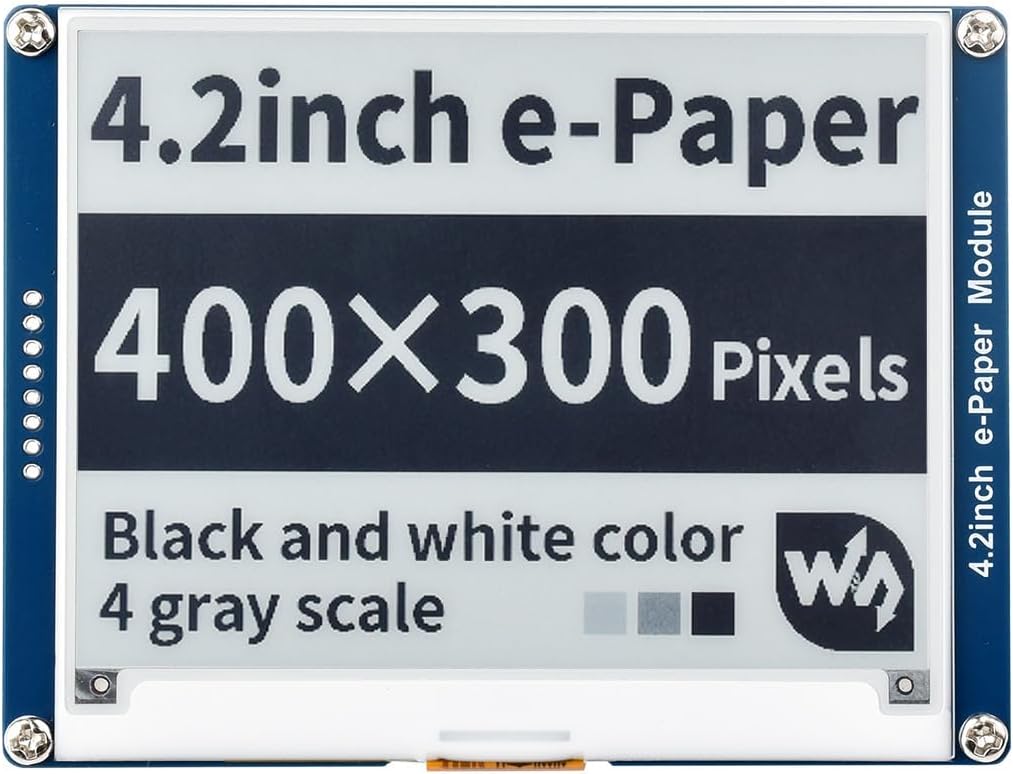
The 4.2″ module steps up to 400×300 pixels and adds 4-level grayscale support, a genuine visual upgrade over pure black-and-white panels. That extra grayscale range means fonts render with visibly smoother edges and simple images or icons look noticeably less harsh, since intermediate shades of gray fill in what would otherwise be jagged black-and-white transitions. For anything text-heavy, like a multi-line weather dashboard or a small e-reader style project, this difference is immediately noticeable.
The larger resolution does come with a memory cost worth planning for. A full 400×300 grayscale frame buffer takes considerably more RAM than the smaller black-and-white modules, and on a memory-constrained board like a basic Arduino Uno, this can be tight or require partial-window updates rather than holding the entire frame in memory at once. An ESP32 or a Raspberry Pi handles this without issue, and it is worth factoring into your board choice if you are set on this display size.
Specifications:
- Resolution: 400×300 pixels
- Colors: 4-level grayscale
- Refresh: Partial and full
- Interface: SPI, 3.3V/5V compatible
Why it stands out:
- 4-level grayscale gives noticeably cleaner text and graphics than pure black-and-white displays
- 400×300 resolution provides genuine room for a real information dashboard layout
- Partial refresh support keeps updates reasonably fast despite the larger screen area
- Good middle ground between the small budget modules and the large 7.5″ panels below
Things to keep in mind:
- Larger frame buffer requires more RAM, tight on basic Arduino boards, comfortable on ESP32 or Pi
- Physically larger footprint than the 2.13″ and 2.9″ modules, plan enclosure size accordingly
- Costs meaningfully more than the smaller black-and-white options
👉 Buy Waveshare 4.2″ e-Paper Module on Amazon
Verdict: The right size once a small display starts feeling cramped and you want genuinely improved visual quality, not just more pixels. Pair it with an ESP32 or Raspberry Pi rather than a basic Arduino Uno for comfortable memory headroom.
5. Best for Raspberry Pi Dashboards: Waveshare 7.5″ e-Paper HAT
Waveshare 7.5inch e-Paper HAT (800×480)
Best for: Wall-mounted information dashboards, large-format displays, and any project where the screen needs to be readable from across a room.

At 800×480 pixels, the 7.5″ HAT is genuinely the gold standard for Raspberry Pi-based information dashboards, and it earns that reputation honestly. This is enough resolution to display a full weather summary, a calendar, system statistics, or a stock ticker with room to spare, all legible from a normal viewing distance without a backlight. It plugs directly onto a Raspberry Pi’s 40-pin GPIO header, and standby power draw is close enough to zero that a battery-backed Pi setup using this display can run for a genuinely long time between charges.
Because it uses the same 3.3V/5V compatible SPI interface as the smaller modules, it also works fine wired to an ESP32 or Arduino Mega if you specifically want a non-Pi build, though the HAT form factor is clearly optimized for direct Pi mounting. Waveshare’s demo code and the GxEPD2 library both support this panel well, and most people report being up and running with a basic working display within an hour of unboxing.
Specifications:
- Resolution: 800×480 pixels
- Colors: Black/White (2 levels)
- Refresh: Partial and full
- Interface: SPI, 3.3V/5V compatible
- Form factor: Raspberry Pi HAT (GPIO)
Why it stands out:
- 800×480 resolution is genuinely large enough for a full multi-element information dashboard
- Plugs directly onto Raspberry Pi GPIO with essentially zero setup friction
- Readable from across a room with no backlight required
- Near-zero standby power makes long battery-backed deployments realistic
- Widely considered the reference display for Pi-based e-paper dashboard projects
Things to keep in mind:
- Significantly larger physical footprint than the smaller modules in this roundup, plan mounting space accordingly
- Black and white only, no color variant at this exact size in the standard version
- Best paired with a Raspberry Pi or ESP32 rather than a basic Arduino Uno given the larger frame buffer
👉 Buy Waveshare 7.5″ e-Paper HAT on Amazon
Verdict: The display to buy for any serious wall-mounted or desk dashboard project. Nothing else in this roundup matches its combination of screen size, readability, and near-zero standby power draw.
6. Best Large Tri-Color Display: Waveshare 7.5″ e-Paper (B)
Waveshare 7.5inch e-Paper Module (B) Tri-Color
Best for: Large-format displays where color highlighting adds real value, like a menu board, a large status display, or a color-coded schedule.

This is the tri-color version of the 7.5″ panel above, adding red alongside black and white at the same 800×480 resolution. The use case shifts meaningfully with the added color and the larger canvas: a restaurant menu board with red price highlights, a large-format status display where red clearly signals an alert state, or a color-coded weekly schedule are all genuinely more useful with a third color available at this size than they would be in black-and-white alone.
The same tri-color trade-off from the smaller 2.9″ (B) module applies here, and it matters more at this larger size: no partial refresh, and full refresh on a panel this large takes around 19 seconds. For a display that updates once a day or once every few hours, that refresh time is a complete non-issue. For anything wanting fast or frequent updates, this is not the right panel, and the standard black-and-white 7.5″ HAT above will serve you better.
Specifications:
- Resolution: 800×480 pixels
- Colors: Red/Black/White (tri-color)
- Refresh: Full only, no partial refresh
- Full refresh time: ~19 seconds
- Interface: SPI, 3.3V/5V compatible
Why it stands out:
- Largest tri-color e-paper option in this roundup, ideal for menu boards and large status displays
- Color highlighting genuinely improves usability at this display size compared to black-and-white alone
- Same 800×480 resolution as the standard 7.5″ HAT, so layout work transfers between the two
- Good fit for infrequently updated large-format signage
Things to keep in mind:
- No partial refresh, every update takes the full ~19 second refresh cycle
- Not the right choice for any project needing responsive or frequent updates
- The most expensive standard Waveshare module in this roundup
👉 Buy Waveshare 7.5″ e-Paper (B) on Amazon
Verdict: Reserve this for large-format projects that specifically benefit from color and update infrequently. If your dashboard needs quick refreshes, the black-and-white 7.5″ HAT above is the better tool for the job.
7. Best All-in-One Board: LILYGO T5 4.7″ ESP32 e-Paper Board
LILYGO T5 4.7inch ESP32 e-Paper Development Board
Best for: WiFi-connected e-paper projects where you want a single integrated board rather than wiring a separate display to a separate microcontroller.
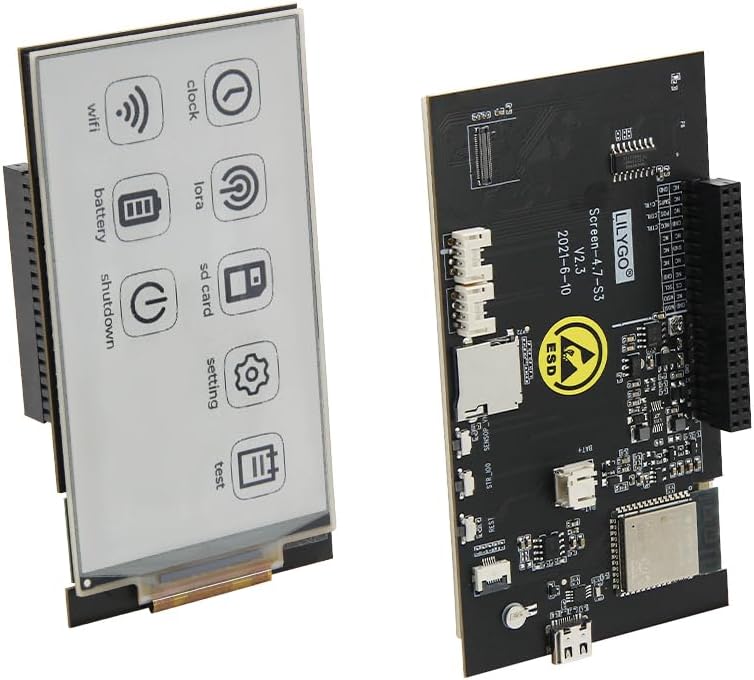
The LILYGO T5 is a genuinely different kind of product from everything else in this roundup: it is not a bare display module you wire to a separate board, it is a complete development board with a 540×960 pixel, 16-level grayscale e-paper panel built directly onto an ESP32-S3 with 16MB of flash and 8MB of PSRAM. WiFi and Bluetooth 5.0 are both onboard, and a LiPo battery connector means you can build a fully wireless, battery-powered device without adding a single extra component.
This combination makes it the natural choice for connected e-paper projects: an MQTT-fed dashboard, an OTA-updated price board, a portable e-reader, or a low-power IoT sensor display that wakes from deep sleep, checks in, updates the screen, and goes back to sleep. Because the display and microcontroller share a single board, there is no separate wiring step and no guessing about pin assignments, you program it directly through the Arduino IDE or VS Code and the display driver is already integrated into LILYGO’s board support package.
Specifications:
- Resolution: 540×960 pixels
- Colors: 16-level grayscale
- Processor: ESP32-S3
- Flash: 16MB
- PSRAM: 8MB
- Connectivity: WiFi 802.11 b/g/n, Bluetooth 5.0
- Battery: LiPo connector onboard
- Refresh: Partial and full
Why it stands out:
- Fully integrated board eliminates all external wiring between display and microcontroller
- 16-level grayscale is the richest color depth of any display in this roundup
- Onboard WiFi and Bluetooth make connected projects straightforward from the first sketch
- LiPo battery connector supports genuinely portable, wireless deployments
- ESP32-S3 with 16MB flash and 8MB PSRAM comfortably handles the large 540×960 frame buffer
Things to keep in mind:
- Highest price point in this roundup by a meaningful margin
- Larger and more rigid form factor than a bare display module, less flexible for custom enclosures
- Overkill if your project does not need WiFi or portability, a bare module paired with an existing board is more cost effective
👉 Buy LILYGO T5 4.7″ ESP32 e-Paper Board on Amazon
Verdict: The best choice for a connected, portable e-paper project where you want one board doing everything. If you already have a microcontroller you are happy with and just need a display, one of the bare Waveshare modules above will save you money.
Which e-Paper Display Should You Buy?
For most Arduino and ESP32 hobbyists, the Waveshare 2.9″ e-Paper Module is the best e-paper display to start with. It balances screen size, refresh speed, and price better than anything else here, and it works identically whether you are wiring it to an Arduino, an ESP32, or plugging it into a Raspberry Pi. If your budget is tighter or your project genuinely only needs a small readout, the Waveshare 2.13″ HAT V4 is a completely reasonable smaller and cheaper alternative.
If your project would benefit from a third color for alerts or highlights, choose between the 2.9″ (B) for a compact tri-color option or the 7.5″ (B) if you need that color at a larger, more dashboard-scale size, just budget for the slower full-refresh-only update cycle either way. For a genuine information dashboard, especially on Raspberry Pi, the 7.5″ HAT in black-and-white is the reference choice, offering enough space and resolution to display real, useful information from across a room.
If you want the smoothest possible visual quality on a mid-size screen, the 4.2″ module’s grayscale support is a meaningful step up from pure black-and-white. And if your project needs to be wireless, connected, and battery-powered without a separate microcontroller, the LILYGO T5 does more in a single board than any combination of a bare display and a separate ESP32 could offer as conveniently.
Understanding e-Paper Display Technology
How e-Paper Actually Works
E-paper displays use electrophoretic technology: tiny microcapsules containing charged black and white (and sometimes red) particles are suspended in a clear fluid between two electrode layers. Applying an electric field moves the charged particles to one side or the other of each microcapsule, making that pixel appear either black or white by reflecting ambient light. Because there is no backlight and no continuously powered pixel array, the display consumes essentially no power once an image is set, drawing current only during the brief moment an update actually occurs. This bistable property is what makes e-paper genuinely different from every other display technology covered elsewhere on this site, including OLED and standard LCD panels.
Partial Refresh vs Full Refresh
Full refresh clears the entire screen to a blank state and rewrites the whole image, which is what causes the visible black flash you may have seen in e-paper demo videos. Partial refresh updates only the specific pixels that changed, skipping the full clear cycle, which is dramatically faster and has no visible flash. Not every panel supports partial refresh: tri-color displays generally cannot, because managing two separate color planes requires the full two-stage update process every time. When choosing a display, matching the refresh capability to your actual update frequency matters more than most other specs on the sheet.
Grayscale vs Tri-Color: Different Trade-offs
Standard black-and-white panels are the fastest and cheapest option. Grayscale panels, like the 4.2″ module in this roundup, add intermediate shades without needing a second color plane, which is why they can still support partial refresh. Tri-color panels add red (or occasionally yellow) using a genuinely separate physical layer of particles, which is why they lose partial refresh capability entirely. Choose grayscale if visual smoothness matters more than color. Choose tri-color only if you have a specific use case where a highlight color adds real value, and you are comfortable with full-refresh-only updates.
Libraries and Software
The GxEPD2 library by Jean-Marc Zingg is the standard driver for Arduino and ESP32 projects and supports virtually every Waveshare panel covered in this guide. ESPHome includes a dedicated waveshare_epaper display platform if you are integrating with home automation rather than writing raw Arduino sketches. For power-sensitive designs, pairing any of these displays with ArduinoYard’s ESP32 sleep modes guide lets you combine the display’s near-zero standby draw with deep sleep on the microcontroller side, stretching a single battery charge from days into months for infrequently updated projects.
Final Recommendation
The Waveshare 2.9″ e-Paper Module is the best e-paper display for Arduino and ESP32 for the widest range of projects: a genuine balance of size, speed, and price that suits everything from a simple clock to a small sensor dashboard. For a serious wall-mounted information display, step up to the 7.5″ HAT, and if your project needs to be wireless and battery-powered without any extra wiring, the LILYGO T5 does the most with the least additional hardware.
Before finalizing your build, ArduinoYard’s ESP32 sleep modes guide is worth reading if battery life matters, and our SPI TFT display guide is a useful comparison if you are still deciding whether e-paper or a standard color screen is the right fit for your specific project.
Comparing display technologies for your next build? Our guides on the Best OLED Displays for Arduino and ESP32, Best TFT Display for Arduino and ESP32, and Best LCD Display for Arduino and ESP32 cover the emissive alternatives worth knowing about.