
If you want to learn robotics without spending weeks sourcing parts separately, an Arduino robot car kit is the fastest way in. You get a chassis, motors, sensors, a compatible controller board, and working sample code in one box. The hard part is knowing which kit actually delivers on that promise and which one leaves you drowning in a vague PDF and missing jumper wires.
This guide covers seven best Arduino robot car kits across a range of build styles and budgets, from a classic 4WD obstacle-avoider to a full robotic arm car and a premium 3-in-1 platform. Every kit here is based on Arduino-compatible hardware, uses standard C++ in the Arduino IDE, and ships with enough components to get moving on day one.
Already have motors and drivers but need help with the software side? Check out our guides on the Best DC Motor Driver for Arduino and ESP32 and the Best Arduino Sensor Kits for more component-level options.
Quick Comparison Table
| Kit | Drive Type | Key Sensors | Control Methods | Best For |
|---|---|---|---|---|
| ELEGOO Smart Robot Car V4.0 | 4WD skid-steer | Ultrasonic, IR, line tracking | IR remote, Bluetooth, app | Best overall beginner kit |
| ELEGOO Conqueror Robot Tank | Tank tread | Ultrasonic, IR | IR remote, Bluetooth, app | Rugged tank-tread builds |
| OSOYOO Servo Steering Car | Front-wheel servo | Ultrasonic, line tracking | WiFi, Bluetooth, IR | Realistic car-style steering |
| OSOYOO WiFi/IoT Robot Car | 4WD skid-steer | Ultrasonic, line tracking | WiFi (ESP8266), IR | IoT and WiFi control projects |
| ACEBOTT 5DOF Robot Arm Car | 4WD skid-steer | Ultrasonic, IR | App, IR remote | Robotic arm + driving combo |
| XiaoR GEEK DS Robot Car | 4WD skid-steer | Ultrasonic, IR, line tracking | Bluetooth, IR | Sensor-rich advanced builds |
| Makeblock mBot Ranger 3-in-1 | Configurable | Ultrasonic, line follower, light | Scratch, Arduino IDE, app | Premium hybrid / educational |
1. Best Overall: ELEGOO Smart Robot Car Kit V4.0
ELEGOO UNO R3 Smart Robot Car Kit V4.0
Best for: First-time builders who want a proven kit with solid documentation and broad community support.

The ELEGOO Smart Robot Car V4.0 has earned its reputation as the default recommendation for anyone asking where to start with Arduino robotics. Version 4 adds a camera module for FPV control over WiFi, which bumps it well above earlier versions that topped out at Bluetooth. The UNO R3-compatible controller board means every piece of standard Arduino documentation applies, and ELEGOO’s tutorial package includes HD assembly videos, well-commented code, and a dedicated app for both Android and iOS.
Assembly takes two to four hours for a complete beginner and involves no soldering. The chassis is acrylic, which is lighter than metal but still sturdy enough for indoor use. Four DC motors with a dual-channel motor driver handle skid-steer movement, and the included sensors cover the most common beginner robotics modes: ultrasonic obstacle avoidance, IR line tracking, IR remote control, and Bluetooth app control. The FPV camera is what separates V4 from everything else at this price point.
Specifications:
- Controller: ELEGOO UNO R3 (Arduino-compatible)
- Drive: 4WD, skid-steer
- Sensors: HC-SR04 ultrasonic, IR obstacle avoidance, IR line tracking
- Connectivity: HC-08 Bluetooth, WiFi camera module
- Battery: 2000mAh lithium, USB-charged
- Assembly: No soldering, screwdriver only
Why it stands out:
- FPV camera with WiFi video streaming is rare at this price tier
- Among the most documented kits on the market, with video tutorials for every assembly step
- Large active community on Reddit and the ELEGOO forums for troubleshooting
- BLE app available for both Android and iOS, no third-party software needed
- 24-module package covers a genuine range of modes rather than one trick
Things to keep in mind:
- Acrylic chassis is not suitable for rough surfaces or outdoor use
- FPV range is limited to local WiFi network
- Skid-steer turning is functional but not the most elegant to watch
👉 Buy ELEGOO Smart Robot Car Kit V4.0 on Amazon
Verdict: This is the kit most people should buy first. The FPV addition to V4 makes it meaningfully better than older versions, and the documentation quality is genuinely hard to beat. If this is your first robot car, start here.
2. Best Tank-Tread Build: ELEGOO Conqueror Robot Tank Kit
ELEGOO Conqueror Robot Tank Kit with UNO R3
Best for: Builders who want a more rugged platform with tank-tread drive and a more aggressive aesthetic.

The Conqueror swaps the standard four rubber wheels for a dual-track tank tread system. This changes the character of the build significantly. Tank treads handle carpet, slight inclines, and uneven indoor surfaces better than wheeled chassis, and the look is a step up from a flat acrylic platform. ELEGOO kept the same UNO R3-compatible controller and documentation style as the Smart Car series, so the learning curve is similar.
The sensor package mirrors the V4.0 in most ways: ultrasonic obstacle detection, IR remote, and Bluetooth app control. The Conqueror also includes a servo-mounted ultrasonic sensor that can sweep left and right for more effective obstacle mapping, rather than just reading straight ahead. That single detail makes autonomous navigation noticeably more capable. It uses the same Android and iOS app as the Smart Car series.
Specifications:
- Controller: ELEGOO UNO R3 (Arduino-compatible)
- Drive: Dual-track tank tread, skid-steer
- Sensors: HC-SR04 ultrasonic (servo-mounted), IR obstacle, IR line tracking
- Connectivity: Bluetooth, IR remote
- Assembly: No soldering required
Why it stands out:
- Tank tread drive handles rougher surfaces than wheeled alternatives
- Servo-mounted ultrasonic sensor adds proper left-right scanning capability
- ELEGOO documentation quality carries over from the Smart Car line
- Looks significantly more intimidating, which matters if this is a gift
- Same app and IDE workflow as other ELEGOO kits, so switching between kits is easy
Things to keep in mind:
- No WiFi or FPV camera, unlike the V4.0 Smart Car
- Tank treads can occasionally de-track if driven at full speed over sharp edges
- Slightly more involved assembly than the wheeled version
👉 Buy ELEGOO Conqueror Robot Tank Kit on Amazon
Verdict: A solid step sideways from the standard Smart Car rather than up or down. If the tank aesthetic appeals to you, or you want better surface handling, the Conqueror delivers. If FPV control matters more, go back to the V4.0.
3. Best Realistic Steering: OSOYOO Servo Steering Smart Robot Car
OSOYOO Servo Steering Smart Robot Car Kit for Arduino
Best for: Anyone who wants a car that steers like a real vehicle, with front-wheel turning rather than skid-steer.

Most Arduino robot cars use skid-steer: the left motors run forward and the right motors run in reverse to turn. It works, but it does not resemble how a real car moves. The OSOYOO Servo Steering kit uses an SG90 servo motor connected to the front axle for proper Ackermann-style turning. The rear wheels are driven by a DC motor, and the front wheels turn left and right under servo control. The result is a robot that drives more like an RC car than a tank.
This has practical implications for learning. If you are interested in autonomous vehicle concepts, understanding how real steering geometry works is more relevant than skid-steer logic. The kit includes ultrasonic obstacle avoidance, line tracking sensors, Bluetooth app control, WiFi app control via the included ESP8266-based WiFi shield, and IR remote control. OSOYOO provides step-by-step lessons on their website rather than a physical manual, with each lesson building on the previous one.
Specifications:
- Controller: Arduino UNO R3 (included)
- Drive: Rear-wheel drive, servo front steering
- Sensors: HC-SR04 ultrasonic, IR line tracking
- Connectivity: ESP8266 WiFi module, Bluetooth, IR remote
- Steering: SG90 servo motor, front axle
- Assembly: No soldering, screwdriver only
Why it stands out:
- Servo-based front steering is unique in this price range and teaches real automotive control concepts
- Both WiFi and Bluetooth control included in the same kit
- OSOYOO’s lesson-based tutorial structure builds skills progressively
- Good bridge between beginner robotics and more advanced autonomous vehicle projects
- North American-based customer support with email response within 24 hours
Things to keep in mind:
- Rear-wheel drive with servo steering can feel twitchy at higher speeds
- OSOYOO’s tutorial website requires an internet connection during assembly sessions
- Turning radius is wider than skid-steer designs due to the mechanical steering geometry
👉 Buy OSOYOO Servo Steering Robot Car on Amazon
Verdict: The most distinctive drive system in this roundup. If you care about how real cars steer and want to build something that reflects that, this is the one to get. It is not necessarily better than skid-steer for robotics learning, but it teaches different and equally valuable concepts.
4. Best for IoT and WiFi Control: OSOYOO WiFi Robot Car Kit
OSOYOO WiFi Smart Robot Car Kit for Arduino (ESP8266)
Best for: Builders focused on IoT projects who want to control their robot over a local network or integrate it with web-based applications.

This kit centres around WiFi connectivity as the primary control method. The included OSOYOO UART WiFi Shield V1.3 runs on an ESP8266 chip (specifically the ESP-12S module), which stacks directly onto the Arduino UNO R3 without any extra wiring. It communicates with the Arduino via software serial, keeping the hardware UART free. The result is a robot you control from a browser or a mobile app over your local network, not just from a Bluetooth-paired phone at arm’s length.
The car itself is a 4WD skid-steer platform with ultrasonic obstacle avoidance, IR line tracking, and an IR remote option as a backup. The real draw is the WiFi-first approach: OSOYOO provides sample code and app support for both STA mode (connecting to your router) and AP mode (the car acts as its own hotspot). Their 6-lesson online tutorial covers everything from basic movement commands to IoT-style sensor data transmission, which is genuinely useful if you want to go beyond just driving the robot around.
Specifications:
- Controller: Arduino UNO R3 (included)
- Drive: 4WD, skid-steer
- Sensors: HC-SR04 ultrasonic, IR line tracking
- Connectivity: ESP8266 WiFi (ESP-12S via UART shield), IR remote
- WiFi modes: STA (router) and AP (hotspot)
- Assembly: No soldering required
Why it stands out:
- ESP8266-based WiFi shield included as the primary control interface, not an afterthought
- STA and AP modes give genuine flexibility for different environments
- Control range is your WiFi network, far beyond Bluetooth’s typical 10m
- Compatible with custom web apps and third-party IoT platforms
- OSOYOO’s structured lesson series covers IoT concepts specific to this kit
Things to keep in mind:
- WiFi setup requires configuring SSID and password in the sketch, which trips up some beginners
- ESP8266 UART communication can occasionally cause timing issues with other serial peripherals
- Control latency over WiFi is slightly higher than Bluetooth for real-time driving
👉 Buy OSOYOO WiFi Robot Car Kit on Amazon
Verdict: A natural fit if you are interested in IoT-style projects and want your robot to be more than a Bluetooth toy. The ESP8266 shield integration works well, and the extended control range is genuinely useful. Just be prepared to spend time in the Arduino IDE getting the WiFi configuration right.
5. Best Robotic Arm Combo: ACEBOTT 5DOF Smart Robot Arm Car Kit
ACEBOTT 5DOF Smart Robot Arm Car Kit for Arduino
Best for: Builders who want both a mobile robot platform and a working robotic arm in a single kit.

The ACEBOTT kit answers a question a lot of builders eventually ask: what if the robot could pick things up? A 5-DOF (five degrees of freedom) robotic arm is mounted on a 4WD chassis, giving you a mobile platform that can also grip and move small objects. The arm uses five servo motors and can be controlled via the included app, which provides dedicated controls for both driving and arm positioning simultaneously.
ACEBOTT designs their kits to support multiple programming environments: Arduino C++, Python, and Blockly visual programming are all compatible. This makes the kit usable at different skill levels, from younger builders using Blockly to adults writing Python or C++ from scratch. The chassis is 4WD with skid-steer and includes ultrasonic obstacle avoidance and IR sensing. The arm’s range of motion is sufficient for pick-and-place tasks with small objects, and the included gripper clamp handles items up to a few centimetres wide.
Specifications:
- Controller: Arduino-compatible (ACEBOTT board)
- Drive: 4WD, skid-steer
- Arm: 5DOF with 5 servo motors and gripper
- Sensors: Ultrasonic, IR obstacle avoidance
- Connectivity: App control (Bluetooth), IR remote
- Programming: Arduino C++, Python, Blockly
Why it stands out:
- 5DOF robotic arm included, making this a fundamentally different learning experience from pure driving kits
- Multi-language programming support covers a wide range of skill levels
- App controls driving and arm positioning simultaneously
- Pick-and-place capability opens up projects no other kit in this list can do
- Good kit for students or educators who want to introduce arm kinematics alongside basic robotics
Things to keep in mind:
- Arm payload is limited; designed for small lightweight objects only
- Assembly is more involved than simpler 4WD kits due to the arm mechanism
- App-based arm control has a learning curve for precise positioning
👉 Buy ACEBOTT 5DOF Robot Arm Car Kit on Amazon
Verdict: If you want a robot that moves and manipulates objects, this is the kit to buy. The 5DOF arm is the standout feature, and the multi-language support makes it accessible at different experience levels. It costs more and takes longer to build, but nothing else on this list can do what it does.
6. Best for Sensor-Rich Advanced Builds: XiaoR GEEK DS Robot Car Kit
XiaoR GEEK DS Arduino Robot Car Kit
Best for: Intermediate builders who want more sensors and more expansion options than a standard beginner kit provides.

The XiaoR GEEK DS kit is pitched at builders who have already assembled a basic robot car and want something with more depth. It ships with an Arduino UNO R3, a more substantial metal chassis, 4WD skid-steer drive, and a richer sensor array than most kits at this price point. Line tracking, ultrasonic obstacle avoidance, and IR sensing are all included, and the board design makes it easier to add additional modules without fighting for GPIO pins.
XiaoR GEEK’s documentation takes a project-based approach, walking through each sensor mode as a separate lesson rather than dumping all the code in one file. The metal chassis is more durable than acrylic alternatives and handles rougher surfaces better. Bluetooth and IR remote control are included. The kit is also popular in school robotics clubs, which reflects well on its assembly clarity and the completeness of its component count.
Specifications:
- Controller: Arduino UNO R3 (included)
- Chassis: Metal (more durable than acrylic)
- Drive: 4WD, skid-steer
- Sensors: Ultrasonic, IR line tracking (multiple sensors), IR obstacle avoidance
- Connectivity: Bluetooth, IR remote
- Programming: Arduino C++ via Arduino IDE
Why it stands out:
- Metal chassis is noticeably more durable and stable than acrylic
- Richer sensor array compared to entry-level kits, with multi-sensor line tracking
- Project-based tutorial structure works well for self-directed learning
- GPIO expansion header makes adding custom modules easier
- Good choice for school or club use due to component completeness and build quality
Things to keep in mind:
- Higher price reflects the metal chassis and sensor count, not WiFi or camera features
- Bluetooth only, no WiFi, so control range is limited compared to the OSOYOO WiFi kit
- Less name recognition means a smaller community compared to ELEGOO
👉 Buy XiaoR GEEK DS Robot Car Kit on Amazon
Verdict: The metal chassis and multi-sensor setup make this feel like a step up in build quality. It is a good choice for builders who found the acrylic chassis of ELEGOO kits frustrating, or for anyone who wants a platform that will hold up to repeated assembly and disassembly over time.
7. Best Premium Kit: Makeblock mBot Ranger 3-in-1
Makeblock mBot Ranger 3-in-1 Programmable Robot Kit
Best for: Buyers who want a premium, all-metal build with three distinct robot configurations and both block-based and Arduino coding support.
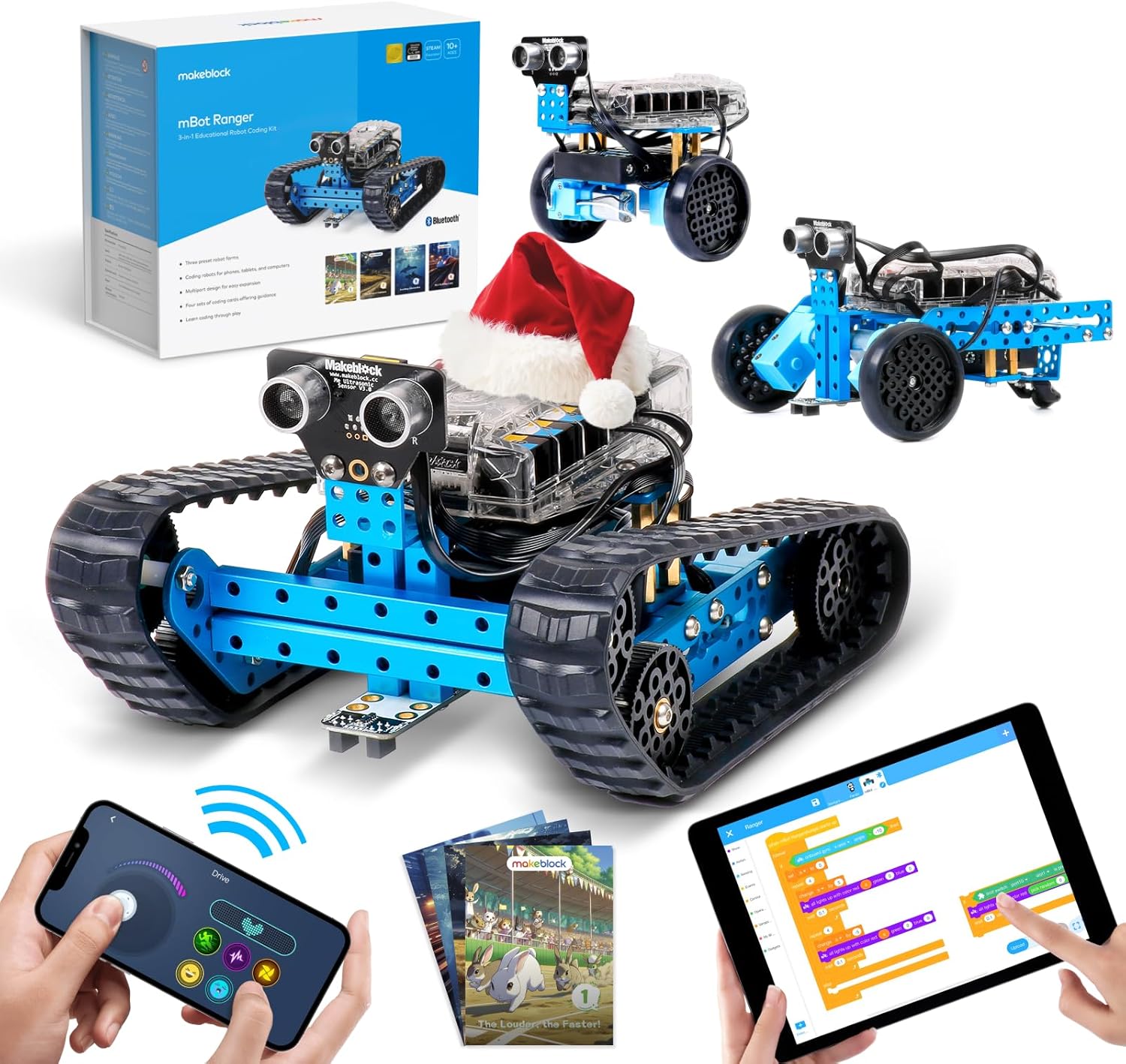
The mBot Ranger is in a different category from everything else on this list. It is built from aluminium, not acrylic or basic plastic. It ships with enough parts to assemble three completely different robot configurations: a 3-wheel self-balancing car, a 4-wheel land racer, and a tank-tread crawler. Each configuration has different movement characteristics and sensor setups, which means you genuinely get three different learning experiences from a single kit.
The Me Auriga mainboard is derived from Arduino Mega 2560, with more I/O pins, more memory, and onboard RGB LEDs and a speaker. Programming can be done in Scratch-based mBlock (drag and drop), or in the Arduino IDE using standard C++. Makeblock’s build quality is the standout: the metal construction, precision connectors, and well-designed instruction booklet are noticeably better than any other kit in this roundup. The included sensors cover ultrasonic, line following, and light sensing, and the board has enough expansion ports to add almost any standard Arduino sensor module.
Specifications:
- Controller: Me Auriga (Arduino Mega 2560-based)
- Chassis: Aluminium (3-in-1 configurable)
- Drive: Configurable (3-wheel balancing, 4-wheel racer, tank tread)
- Sensors: Ultrasonic, line follower, light sensor, onboard gyroscope
- Connectivity: Bluetooth app control
- Programming: mBlock (Scratch-based), Arduino IDE (C++)
- Extras: Onboard RGB LEDs, buzzer
Why it stands out:
- Three robot configurations from one kit, each genuinely different to build and program
- Aluminium construction is the most durable in this roundup by a significant margin
- Arduino Mega 2560-based board gives far more I/O and memory than UNO-based kits
- Dual programming modes let beginners start with Scratch and graduate to C++
- Onboard gyroscope enables the self-balancing mode, which is technically impressive to program
Things to keep in mind:
- The most expensive kit in this roundup by a meaningful margin
- Heavier and more complex to assemble than simpler kits
- Bluetooth only; no WiFi or FPV capability
👉 Buy Makeblock mBot Ranger 3-in-1 on Amazon
Verdict: If budget is not the deciding factor, the mBot Ranger is the best kit here. The build quality, three configurations, and Mega-based controller all justify the price. It works especially well as a longer-term learning platform because the aluminium chassis survives repeated disassembly and the Mega board gives you room to grow with more complex projects.
Which Arduino Robot Car Kit Should You Buy?
For most people starting out, the ELEGOO Smart Robot Car V4.0 is the right call. It has the best documentation, the largest support community, and the FPV camera gives you something to show off immediately. Unless something specific about another kit appeals to you, start here and learn the basics before upgrading.
If tank treads matter more to you than a camera, swap the V4.0 for the ELEGOO Conqueror. The servo-mounted ultrasonic sensor actually makes autonomous navigation work better, and the build quality is on the same level.
The OSOYOO Servo Steering kit is the pick if you are interested in how real vehicle steering works. It teaches different concepts from skid-steer designs and is a better choice if autonomous vehicle simulation is where you are headed. The OSOYOO WiFi Robot Car makes more sense if you care less about steering geometry and more about remote control range and IoT integration. Controlling a robot over your home network is genuinely more useful than Bluetooth for some project types.
Go for the ACEBOTT 5DOF if you want to add object manipulation to the mix. No other kit here gives you a functional robotic arm, and the multi-language support means it works for a wider range of skill levels. The XiaoR GEEK DS is the upgrade for builders who are frustrated by acrylic chassis and want a metal platform with more sensors. It costs more but holds up significantly better over time.
The Makeblock mBot Ranger is the premium choice for anyone who wants the best build quality, three distinct robot forms, and a learning platform they will not outgrow within a few months. It costs more than the others, but it delivers more than the others.
Understanding the Key Sensors in Arduino Robot Car Kits
Most kits in this roundup use the same two or three core sensors, and understanding what each one actually does will help you get more out of your kit once it is assembled.
The HC-SR04 ultrasonic sensor is the most common obstacle avoidance sensor in beginner robot kits. It sends out a 40kHz sound pulse and measures how long it takes to bounce back from an object. The Arduino calculates distance from that time value. ArduinoYard has a full wiring and code guide at HC-SR04 with Arduino if you want to understand the math before your kit arrives.
IR line tracking sensors work differently. They emit infrared light downward and detect how much bounces back. Dark surfaces (like a black line on white paper) absorb more IR and reflect less; light surfaces reflect more. The sensor outputs a digital HIGH or LOW signal based on a threshold, and the Arduino reads two or more of these simultaneously to decide whether to steer left, right, or straight. You can read more about IR sensor basics at IR sensor with Arduino.
The L298N motor driver (or similar dual H-bridge chip) is the component that lets a 5V Arduino control DC motors that need significantly more current than the Arduino’s GPIO pins can provide. It acts as a switch: the Arduino sends a direction and speed signal, and the motor driver routes the actual motor power from the battery through whichever motor direction is requested. ArduinoYard’s L298N guide at L298N with Arduino covers the wiring and PWM speed control in detail.
For the servo steering kits, the SG90 servo receives a PWM signal from the Arduino that tells it to rotate to a specific angle, typically 0 to 180 degrees. The steering linkage converts that rotation into left or right wheel turn. ArduinoYard’s servo guide at Servo Motor with Arduino walks through the Servo library and how to map angle values to steering input.
Final Recommendation
The ELEGOO Smart Robot Car V4.0 is the best starting point for most buyers: solid documentation, active community, and the FPV camera gives you a genuinely useful feature above the standard beginner tier. If you want premium build quality and room to grow, the Makeblock mBot Ranger is the kit you will not outgrow.
Before or after building your kit, it is worth understanding the components powering it. ArduinoYard’s guides on the HC-SR04 ultrasonic sensor, L298N motor driver, IR sensors, and servo motors will give you the foundation to modify the sample code and build your own autonomous behaviours rather than just running what came in the box.
Looking for more component-level control? Our guides on the Best DC Motor Driver for Arduino and ESP32, Best Arduino Sensor Kits, and Best ESP32 Development Boards are good next steps for builders who want to go beyond all-in-one kits.
3 thoughts on “Best Arduino Robot Car Kits for Beginners and Makers”