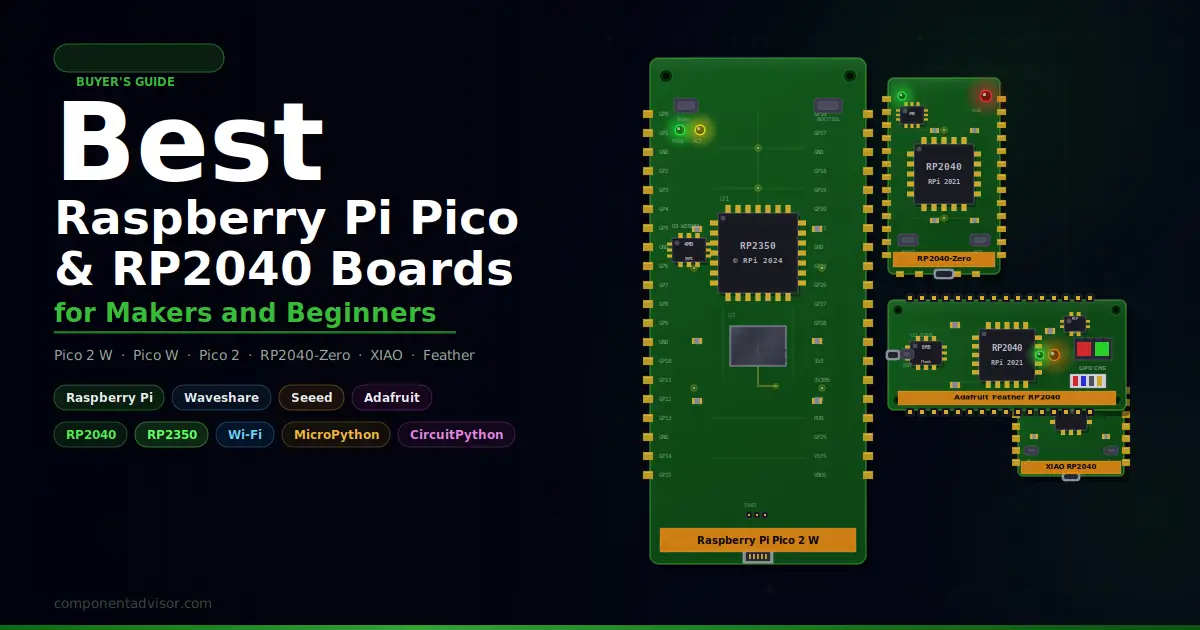
If you’re looking for the best Raspberry Pi Pico board, you’ve landed in the right spot. The Pico family has become one of the most popular microcontroller platforms for makers, students, and hobbyists since it launched in 2021, and with good reason: the RP2040 chip punches well above its price point, MicroPython support is excellent, and the community around it has grown fast. Now with the newer RP2350-powered Pico 2 series in the mix, there are more options than ever across different form factors, wireless capabilities, and use cases.
This guide covers the official Raspberry Pi Pico boards alongside the best third-party RP2040 alternatives. Whether you’re just starting out or you need a compact board for a specific project, there’s a board here that fits.
Already have your board? Check out our Best OLED Displays for Arduino and ESP32 for display options that pair well with the Pico, and our Best Breadboard and Jumper Wire Kit to get your workbench sorted.
Quick Comparison Table
| Board | Chip | Wireless | Flash | GPIO Pins | Best For |
|---|---|---|---|---|---|
| Raspberry Pi Pico 2 W | RP2350 | Wi-Fi + Bluetooth 5.2 | 4MB | 26 | Best overall, IoT projects |
| Raspberry Pi Pico W | RP2040 | Wi-Fi + Bluetooth 5.0 | 2MB | 26 | Budget wireless, proven platform |
| Raspberry Pi Pico 2 | RP2350 | None | 4MB | 26 | Max performance, no wireless needed |
| Waveshare RP2040-Zero | RP2040 | None | 2MB | 29 (20 edge) | Compact builds, tight spaces |
| Seeed Studio XIAO RP2040 | RP2040 | None | 2MB | 11 | Wearables, ultra-small projects |
| Adafruit Feather RP2040 | RP2040 | None | 8MB | 21 | Advanced makers, battery projects |
1. Best Overall Raspberry Pi Pico Board
Raspberry Pi Pico 2 W
Best for: Makers who want the most capable official Pico with wireless connectivity built in.

The Raspberry Pi Pico 2 W is the current top of the Pico lineup. It runs on the RP2350, which is a meaningful upgrade over the original RP2040: faster clock speed (up to 150MHz), double the SRAM (520KB vs 264KB), double the flash (4MB vs 2MB), and new security features including hardware TRNG and signed boot. The fact that it adds all of this while keeping full backward compatibility with existing Pico code and hardware is what makes it so compelling.
The wireless side uses an Infineon CYW43439 for 2.4GHz Wi-Fi 802.11n and Bluetooth 5.2. This opens up IoT projects, web servers, MQTT clients, and remote sensor logging, things that used to require an external module or a switch to ESP32. The RP2350 also supports both Arm Cortex-M33 and RISC-V cores, which is a genuinely unusual feature for a microcontroller at this price.
Specifications:
- Chip: RP2350 (dual-core Arm Cortex-M33, up to 150MHz)
- SRAM: 520KB on-chip
- Flash: 4MB QSPI
- Wireless: 2.4GHz 802.11n Wi-Fi, Bluetooth 5.2
- GPIO: 26 multi-function pins
- ADC: 3 x 12-bit analog inputs
- USB: Micro-USB (USB 1.1 host/device)
- PIO: 3 x 8 state machines
- Dimensions: 51 x 21mm
Why it stands out:
- RP2350 is a significant chip upgrade over the RP2040, not just a minor revision
- Native Wi-Fi and Bluetooth without any external module
- Backward compatible with all Pico W code and accessories
- Dual-architecture: switch between Arm and RISC-V cores
- Strong low-power modes, useful for battery-operated IoT sensors
- Excellent official documentation and MicroPython support
Things to keep in mind:
- Still uses Micro-USB, not USB-C (a common complaint in the community)
- Only one USB port, so no native USB host for peripherals without adapters
- Wireless range is decent but not exceptional for 2.4GHz-only operation
👉 Buy Raspberry Pi Pico 2 W on Amazon
Verdict: The Pico 2 W is the right choice for most new projects. If you’re starting fresh with the Pico ecosystem and want room to grow, especially for IoT or wireless applications, this is the board to get. The RP2350 chip gives it a longer shelf life, and the price is still very low for what you get.
2. Best Budget Wireless Pico Board
Raspberry Pi Pico W (RP2040)
Best for: Beginners who want wireless connectivity at the lowest cost, or anyone with an existing Pico W ecosystem.

The Raspberry Pi Pico W is still very much worth buying in 2025, and not just because it’s cheaper than the Pico 2 W. The original RP2040 platform has two years of tutorials, community projects, HATs, and accessories built around it. If you’re following along with any existing Pico tutorials or working from a course or book, the Pico W is almost certainly what the material is written for.
It uses the same CYW43439 wireless chip as the Pico 2 W, so Wi-Fi and Bluetooth performance is identical. The difference is the processor: the RP2040 runs at up to 133MHz with 264KB of SRAM and 2MB of flash. For the vast majority of beginner and intermediate projects, that’s completely sufficient. Blinking LEDs, reading sensors, running a web server, controlling motors, data logging: the RP2040 handles all of it without breaking a sweat.
Specifications:
- Chip: RP2040 (dual-core Arm Cortex-M0+, up to 133MHz)
- SRAM: 264KB on-chip
- Flash: 2MB QSPI
- Wireless: 2.4GHz 802.11n Wi-Fi, Bluetooth 5.0
- GPIO: 26 multi-function pins
- ADC: 3 x 12-bit analog inputs
- USB: Micro-USB (USB 1.1 host/device)
- PIO: 2 x 4 state machines
- Dimensions: 51 x 21mm
Why it stands out:
- Lower price than the Pico 2 W while keeping full wireless capability
- Massive existing library of tutorials, projects, and community resources
- All existing Pico accessories and HATs work with it
- MicroPython and C/C++ support is extremely mature
- Good power consumption, suitable for battery-powered projects
Things to keep in mind:
- Less SRAM and flash than the Pico 2 W, which matters for CircuitPython or complex apps
- RP2040 is an older chip with no hardware security features
- Only 2 PIO state machines per block vs 3 on the RP2350
👉 Buy Raspberry Pi Pico W on Amazon
Verdict: Don’t overlook the Pico W just because the Pico 2 W exists. For beginners especially, the lower cost and the wealth of existing tutorials make it a great starting point. If you’re following a course or book, check which board it targets and get that one.
3. Best Pico Board Without Wireless
Raspberry Pi Pico 2 (RP2350)
Best for: Projects that need maximum RP2350 performance without the cost of onboard wireless.
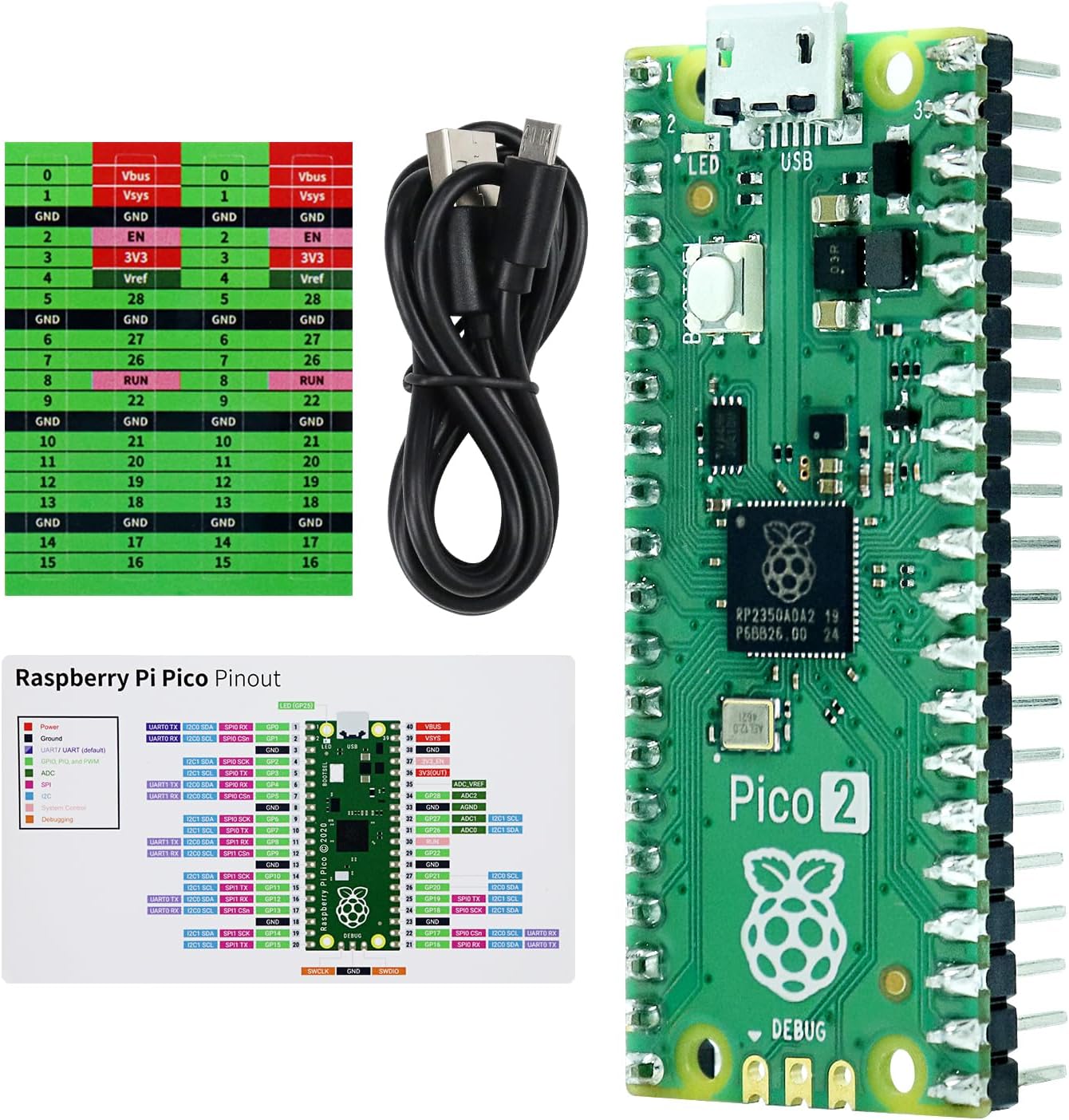
The Raspberry Pi Pico 2 (non-W version) runs the same RP2350 chip as the Pico 2 W but skips the wireless module. That might sound like a downgrade, but it makes perfect sense for a lot of projects. Plenty of embedded applications don’t need Wi-Fi or Bluetooth: display drivers, audio processing, motor control, USB HID devices, and data loggers that write to local storage all run fine without any wireless.
Dropping the wireless chip saves cost and, more importantly for some applications, avoids RF interference and reduces power draw. The Pico 2 gets the same RP2350 benefits: 520KB SRAM, 4MB flash, 150MHz clock, dual-architecture cores, and the upgraded PIO system with three blocks of eight state machines each. That last point is more significant than it sounds: PIO state machines let you implement custom serial protocols, generate precise signals, and handle tasks that would normally require dedicated hardware, all without touching the main cores.
Specifications:
- Chip: RP2350 (dual-core Arm Cortex-M33, up to 150MHz)
- SRAM: 520KB on-chip
- Flash: 4MB QSPI
- Wireless: None
- GPIO: 26 multi-function pins
- ADC: 3 x 12-bit analog inputs
- USB: Micro-USB (USB 1.1 host/device)
- PIO: 3 x 8 state machines
- Dimensions: 51 x 21mm
Why it stands out:
- Full RP2350 performance at a slightly lower cost than the Pico 2 W
- No RF interference for sensitive sensor or audio projects
- Lower power draw than the wireless variant
- Same great official documentation and community support
- Three PIO blocks give you more flexibility for custom peripheral implementations
Things to keep in mind:
- No wireless at all, so you’ll need an external module if you add connectivity later
- If there’s any chance you’ll want Wi-Fi, the Pico 2 W is only slightly more expensive
- Still Micro-USB, same as the rest of the Pico family
👉 Buy Raspberry Pi Pico 2 on Amazon
Verdict: The Pico 2 is the right pick if you already know your project doesn’t need wireless. Audio synthesis, display drivers, USB peripherals, and timing-critical applications will benefit from the RP2350’s extra headroom without paying for a wireless chip you won’t use.
4. Best Compact RP2040 Board
Waveshare RP2040-Zero
Best for: Projects with tight space constraints that still need a capable RP2040 at low cost.

The Waveshare RP2040-Zero is one of the most popular third-party RP2040 boards out there, and it’s easy to see why. It’s roughly half the size of a standard Pico, uses a modern USB-C connector, includes an RGB LED, and costs very little. Despite the tiny footprint, it packs the full RP2040 chip with all its capabilities intact.
What makes the Zero interesting is how Waveshare handled the pin count. The main edge pinout gives you 20 GPIO pins, but there are additional castellated solder pads on the board that expose 9 more pins, bringing the total accessible GPIO to 29. This means you can get more I/O than a standard Pico if you’re comfortable soldering to those pads, which makes it useful for embedded or production-style builds where space and connector count both matter.
The castellated module design also means you can solder it directly to a carrier board, which is useful for custom PCB designs or any project where you want a tidy, permanent installation rather than a board-on-header-pins arrangement.
Specifications:
- Chip: RP2040 (dual-core Arm Cortex-M0+, up to 133MHz)
- SRAM: 264KB on-chip
- Flash: 2MB QSPI
- Wireless: None
- GPIO: 29 total (20 via edge pinout, 9 via solder pads)
- ADC: 4 x 12-bit analog inputs
- USB: USB-C (USB 1.1 host/device)
- PIO: 2 x 4 state machines
- Dimensions: 23.5 x 18mm
Why it stands out:
- Much smaller than a standard Pico while keeping full RP2040 capability
- USB-C connector, a practical upgrade over Micro-USB
- Castellated pads allow direct SMD soldering to carrier boards
- RGB LED onboard for easy visual feedback
- 4 ADC channels vs 3 on the standard Pico
- Very low cost, often available in multi-packs
Things to keep in mind:
- Not pin-compatible with standard Pico HATs or accessories
- Accessing the extra GPIO requires soldering to small pads
- No wireless of any kind
- Smaller size means headers are closer together, which can be fiddly to solder
👉 Buy Waveshare RP2040-Zero on Amazon
Verdict: If you need RP2040 capability in a very small package with USB-C and a bit of extra GPIO, the RP2040-Zero delivers. It’s especially good for custom enclosures, wearable-adjacent builds, or any project where board size is an active constraint. Just don’t expect standard Pico accessories to fit.
5. Best Ultra-Compact RP2040 Board
Seeed Studio XIAO RP2040
Best for: Wearable projects, compact sensor nodes, and anyone who needs the smallest possible RP2040 board.
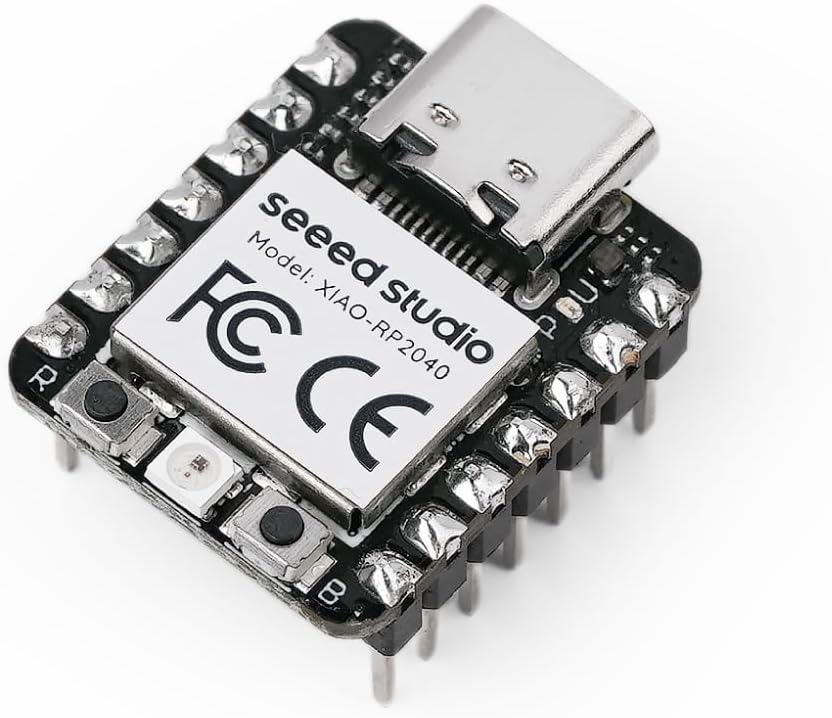
The Seeed Studio XIAO RP2040 takes miniaturization about as far as you can go with an RP2040. At 21 x 17.5mm and under 2 grams, it’s genuinely thumb-sized, and Seeed has managed to keep most of the RP2040’s core functionality intact despite the size. You get USB-C, a reset button, a boot button, an RGB LED, a power LED, and two status indicators, all packed onto a board smaller than a postage stamp.
The trade-off is GPIO count: you get 11 accessible pins versus the 26 on a standard Pico. For many projects, especially sensor-based builds, 11 pins is plenty. The XIAO form factor also has a growing ecosystem of Seeed expansion boards and shields, which helps offset the small pin count by adding features through modular accessories.
The board is pin-compatible with the Seeeduino XIAO, so if you’ve used that platform before, the XIAO RP2040 slots right in. It supports Arduino, MicroPython, and CircuitPython, giving you flexibility on the software side.
Specifications:
- Chip: RP2040 (dual-core Arm Cortex-M0+, up to 133MHz)
- SRAM: 264KB on-chip
- Flash: 2MB QSPI
- Wireless: None
- GPIO: 11 digital pins, 4 analog pins, 11 PWM pins
- Interfaces: 1 x I2C, 1 x SPI, 1 x UART
- USB: USB-C
- Dimensions: 21 x 17.5mm
Why it stands out:
- Smallest RP2040 board you can practically buy
- USB-C, reset button, and RGB LED all included despite the tiny size
- Compatible with Seeeduino XIAO expansion boards and accessories
- Supports Arduino IDE, MicroPython, and CircuitPython
- SMD-friendly design with no components on the back
Things to keep in mind:
- Only 11 accessible GPIO pins, so plan your pin usage carefully
- Not compatible with standard Pico accessories or HATs
- No wireless capability
- Smaller solder pads require steady hands if soldering without headers
👉 Buy Seeed Studio XIAO RP2040 on Amazon
Verdict: The XIAO RP2040 is purpose-built for projects where size is the primary constraint. Wearables, miniature sensor nodes, compact custom enclosures, anything where a standard Pico is simply too large. If 11 GPIO pins are enough for your project, this board is hard to beat.
6. Best RP2040 Board for Advanced Makers
Adafruit Feather RP2040
Best for: Advanced makers who want battery management, more flash, and a mature ecosystem of add-on boards.
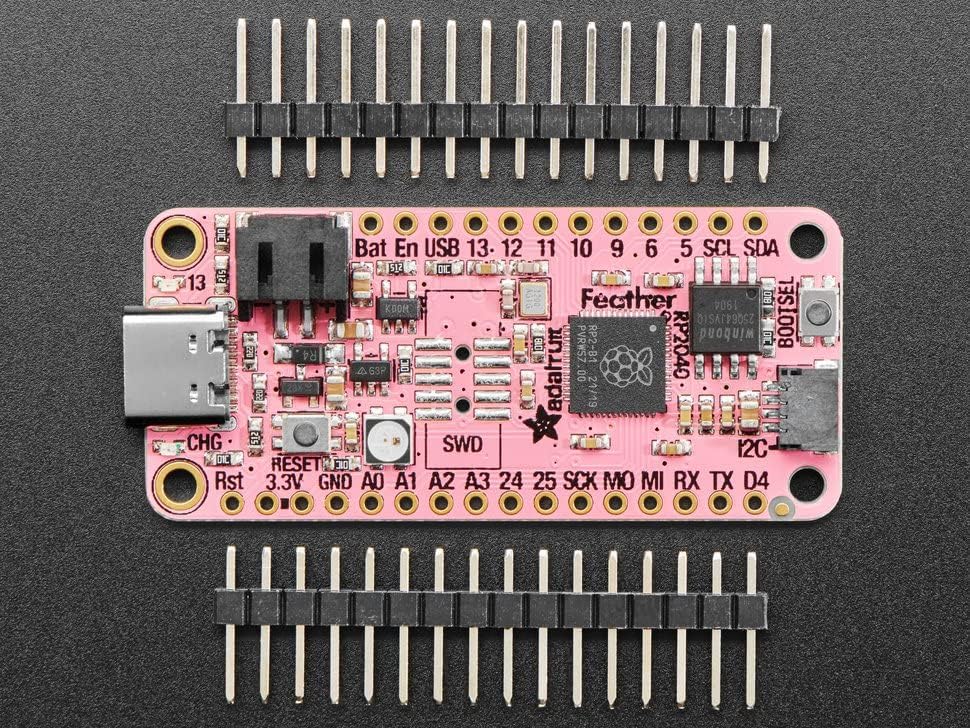
The Adafruit Feather RP2040 is the most fully-featured board on this list, and it’s priced accordingly. What Adafruit brings to the RP2040 is their Feather ecosystem, a well-established standard for interchangeable add-on boards called Wings that snap onto the Feather footprint. If you want to add a display, LoRa radio, motor driver, or GPS to your project without custom wiring, there’s almost certainly a Wing for it.
The practical upgrades over a standard Pico are notable: 8MB of flash instead of 2MB, a built-in LiPo battery charger (just plug in a single-cell LiPo and you have portable power with automatic charging via USB), a NeoPixel RGB LED, a reset button, and a STEMMA QT / Qwiic connector for easy I2C sensor chaining without soldering. The board is breadboard-friendly and ships with quality through-hole components.
Adafruit’s support for CircuitPython is also the best in the business. Their libraries cover an enormous range of sensors and peripherals, and their documentation is thorough. If you’re using CircuitPython specifically, the Feather RP2040 is one of the best platforms to run it on.
Specifications:
- Chip: RP2040 (dual-core Arm Cortex-M0+, up to 133MHz)
- SRAM: 264KB on-chip
- Flash: 8MB QSPI
- Wireless: None
- GPIO: 21 pins (analog and digital mix)
- Battery: Built-in LiPo charger (JST connector)
- Extras: NeoPixel LED, STEMMA QT connector, reset button
- USB: USB-C
- PIO: 2 x 4 state machines
- Dimensions: 50.8 x 22.8mm (standard Feather footprint)
Why it stands out:
- 8MB flash gives significantly more room for CircuitPython, assets, and data logging
- Built-in LiPo charging makes battery-powered projects much simpler
- Feather Wing ecosystem adds enormous expandability
- STEMMA QT connector for tool-free I2C sensor connections
- Adafruit’s CircuitPython libraries and documentation are excellent
- USB-C connector
Things to keep in mind:
- Higher cost than the other boards on this list
- No wireless built in (Adafruit makes wireless Feather variants if needed)
- Feather footprint means it won’t fit on standard Pico HATs or accessories
- Overkill if you just need a basic RP2040 for a simple project
👉 Buy Adafruit Feather RP2040 on Amazon
Verdict: The Feather RP2040 is the go-to board if you want battery power, a large flash, and access to a serious ecosystem of expansion boards. It costs more than any other option here, but it earns that premium for projects that need what it offers. If you’re deep in the Adafruit ecosystem or building something portable, this is the one.
Which Raspberry Pi Pico Board Should You Buy?
If you’re a beginner starting fresh with no existing Pico accessories or tutorials lined up, get the Pico 2 W. It’s the most capable official board, it’s backward compatible with everything, and the extra chip headroom from the RP2350 means you won’t outgrow it quickly. The built-in wireless opens up IoT projects without needing external modules.
If you’re following a course, book, or tutorial series, check which board it targets before buying. A lot of existing Pico learning materials are written for the original Pico W. You can often follow along on a Pico 2 W with minor adjustments, but matching the hardware your tutorial uses saves headaches.
If you already own a Pico W and it’s working fine for your projects, there’s no pressing reason to upgrade. The RP2350 is a meaningful improvement, but it’s not a night-and-day difference for most everyday projects. Save the upgrade budget for when you hit an actual limitation.
For compact builds where the standard Pico form factor is too large, the Waveshare RP2040-Zero is the best balance of size, GPIO count, and cost. If you need to go even smaller and can live with 11 GPIO pins, the Seeed XIAO RP2040 is the right choice for wearables or ultra-tight enclosures.
The Pico 2 without wireless makes sense for projects that deliberately avoid wireless, including audio synthesis, sensitive analog measurements, or USB peripheral devices where RF interference could cause problems or where wireless is genuinely not needed.
Finally, if you’re doing CircuitPython projects, want battery power built in, or are already in the Adafruit ecosystem, the Feather RP2040 is worth its higher price. For everyone else, the official Pico boards offer better value.
Understanding the RP2040 and RP2350 Chips
The RP2040 and RP2350 are both microcontroller chips designed by Raspberry Pi, but they’re meaningfully different under the hood. Here’s what actually matters when choosing between them.
RP2040 vs RP2350: The Key Differences
The RP2040 is the original Raspberry Pi silicon, released in 2021. It features dual Arm Cortex-M0+ cores running at up to 133MHz, 264KB of SRAM, and 2MB of QSPI flash on most boards. It has two PIO blocks, each with four state machines. For most beginner and intermediate projects, it’s more than capable.
The RP2350, which powers the Pico 2 and Pico 2 W, is a generation newer. Key improvements include dual Arm Cortex-M33 cores (faster and more efficient than M0+) running at up to 150MHz, 520KB of SRAM, and typically 4MB of flash on Raspberry Pi boards. It also adds three PIO blocks instead of two, hardware security features (signed boot, hardware TRNG), and lower dormant power consumption. Most unusually, the RP2350 also includes two RISC-V Hazard3 cores that can replace the Arm cores, making it one of the few consumer microcontrollers with a selectable CPU architecture.
In practice, the extra SRAM matters most when running CircuitPython or handling large buffers. The extra flash matters if you’re storing assets like bitmaps or audio samples. The security features matter for commercial or IoT deployments where device integrity is important.
What Is PIO and Why Does It Matter?
PIO stands for Programmable Input/Output. It’s one of the most interesting features of the RP2040 and RP2350, and it’s worth understanding even as a beginner.
In most microcontrollers, you’re limited to the hardware peripherals the chip includes: a fixed number of SPI, I2C, and UART controllers. If you need to talk to a sensor or display using a protocol the chip doesn’t natively support, you’re stuck bit-banging it in software, which is slow and CPU-intensive.
The RP2040 and RP2350 handle this differently. Each PIO block contains small, independent processors called state machines that run their own tiny programs from a separate instruction set. These state machines can toggle GPIO pins at precise, high speeds independently of the main Arm cores. This means you can implement essentially any serial protocol you need, WS2812 LED control, custom sensor protocols, VGA output, and more, without touching your main program loop.
For the RP2040, you get 8 state machines total (2 blocks of 4). For the RP2350, you get 24 (3 blocks of 8). For most projects you’ll never use more than a few, but for complex builds with multiple peripherals, that headroom is genuinely useful.
MicroPython vs C/C++ on the Pico
Both the RP2040 and RP2350 support MicroPython and C/C++ development. Which one you choose depends on what you’re doing.
MicroPython is the easier starting point. You can write code in Python, upload it via drag-and-drop, and iterate quickly without a compile step. The Raspberry Pi Foundation’s official MicroPython build for the Pico is well-maintained, and most common tasks (GPIO, I2C, SPI, PWM, Wi-Fi on the Pico W) have clean, documented APIs. For beginners and for prototyping, MicroPython is the practical choice.
C/C++ gives you full performance and direct hardware access. The official Pico SDK is excellent and well-documented. For timing-critical applications, real-time control, or any project where MicroPython’s interpreter overhead is a problem, C/C++ is the right approach. It has a steeper learning curve but produces faster, more efficient code.
CircuitPython is Adafruit’s fork of MicroPython with a focus on beginner-friendliness and a large library ecosystem. It runs well on RP2040 boards, especially the Adafruit Feather RP2040, which has more flash to accommodate CircuitPython’s larger footprint. If you’re already in the CircuitPython world, any board on this list will run it, though the Feather and Pico 2 variants (with more flash) handle it most comfortably.
Final Recommendation
For most makers, the Raspberry Pi Pico 2 W is the right board to start with. It combines the latest RP2350 chip with built-in Wi-Fi and Bluetooth, and it costs very little. If you’re building something more specific, the Waveshare RP2040-Zero covers compact builds well, and the Adafruit Feather RP2040 is the best option if you need battery power or access to the Feather Wing ecosystem.
For project ideas and tutorials to get started with your new board, check out how to connect an OLED display with Arduino over at ArduinoYard, and the beginner’s guide to PCB soldering if you’re new to working with development boards. If you’re interested in wireless project ideas, the ESP32 deep sleep and wakeup tutorial covers low-power design patterns that translate well to the Pico 2 W.
Looking for more boards to add to your maker setup? Check out our guides to the Best Raspberry Pi Boards and the Best ESP32 Development Boards for comparison. If you’re building a full workbench, our Best Breadboard and Jumper Wire Kit and Best Bench Power Supply guides are worth a look too.
1 thought on “Best Raspberry Pi Pico Board and RP2040 Boards for Makers and Beginners”